Refract
This utility processes one or more HIPS lines, and generates a refraction coefficient file (refCoefficients) for each line in its line directory. The resulting coefficient values can then be used to correct refraction artifacts when the data is merged in the Georeference Bathymetry process.
Format:
refract <lineDirectory> <#profiles>
The parameter #profiles generates a refraction entry by grouping profiles together. The number of profiles must be at least 1.
The following criteria must be met in order for this tool to work effectively:
• The data should be as clean as possible. Noisy data will interfere with the computations.
• The data should be from a relatively flat sea floor. A sloping sea floor is acceptable.
• The vessel file must be set up accurately.
splitMB41
This utility divides SeaBeam MB41 raw data files that cross the dateline or have a large lat/long span. It takes each .mb41 file in <directory> and slices it into one or two pieces. The newly generated files are written to the same directory.
Format:
splitMB41 <directory> <longitude_boundary> <longitude_buffer>
The output .mb41 files have names that are derived from the input file name (for example, file_1.mb41, file_2.mb41, etc).
The file with the _1.mb41 extension contains data which is up to 180 degrees clockwise from the boundary specified. (For example, if boundary is set at180 degrees, then the _1 file contains data from 0.0E - 180.0E).
The file with the _2.mb41 extension contains data from the other 180 degrees. If either of these files contains no data, it is deleted.
Parameters are:
• directory: The directory where the source.mb41 files are located.
• longitude_boundary: The longitude (in degrees) where the split happens.
• longitude_buffer: The buffer (in degrees) on either side of the boundary within which data will not be output.
createTPU
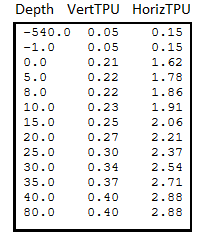
This utility is used to load TPU values into lines using a simple mapping table based on depth. Below is an example of a mapping table.
The data is displayed in three columns: Depth, VertTPU and HorizTPU. Depth units are expected to be in metres, and the TPU values are treated as confidence intervals.
Format:
createTPU <list_file_name> <tpe_file_name> [proc|obs]
Component | Description |
|---|---|
| The name of the file containing the list of lines to be updated. Each line in the file must be in the format:
Vessel, Day and Line are optional and will cause the program to use all lines within the specified folder (recursive). |
| The name of the file containing a table of the TPU mapping values. Each line must have the format:
|
| Optional parameters that specify whether processed depths ( |
For each sounding depth, the vertical TPU (VertTPU) and horizontal TPU (HorizTPU) values are linearly interpolated from the entries in the user-defined mapping table.
VertTPU is the uncertainty associated with the depth value of a sounding and is scaled to 95% (1.96 sigma).
HorizTPU is the uncertainty associated with the position of a sounding and is scaled to 95% (1.96 sigma).
A simple example of a mapping table.
|
|
|
|---|---|---|
|
|
|
|
|
|
|
|
|
|
|
|
|
|
|
To determine the values for a depth of 2.5m, a linear interpolation of the entries in the table between 1.62 and 1.78 is required, as follows:
range between depths
5.0 - 0.0 = 5
distance to specific depth
5.0 - 2.5 = 2.5
range between HorizTPU
1.78 - 1.62 = 0.16
fraction of depth range
(2.5 / 5.0) = 0.50
times the HorizTPU range to get the fraction
0.16 * 0.50 = 0.080
added to the initial value to get the interpolated value
1.62 + 0.080 = 1.700
The interpolated value 1.7 is added, as displayed below.
|
|
|
|---|---|---|
|
|
|
|
|
|
|
|
|
|
|
|
|
|
|
|
|
|
printSBET
This is a dump utility for SBET files, for which the command is print, not “dump”.
Format:
printSBET <Inputfile> <Outputfile>
Inputfile can specify more than one file, and can use the format PATH\*.*.