 CARIS HPD Paper Chart Editor
 CARIS HPD Paper Chart Editor
CARIS HPD Product Editor
CARIS HPD Source Editor
CARIS S-57 Composer
CARIS Paper Chart Composer
Menu | Tools > Editors > Vertical Reference System |
Tool |
|
A vertical reference system defines how height or depth is measured. It consists of an ellipsoid or a datum and other properties based on the these.
The Vertical Reference System Editor lets you view several vertical reference systems that can be assigned to the current data. These systems originate from the European Petroleum Survey Group (EPSG) database of reference systems at http://www.epsg-registry.org/1 These are stored in a spatial reference database file called spatialref.db.
These reference systems are read-only. Only new reference system can be edited or deleted.
Interface
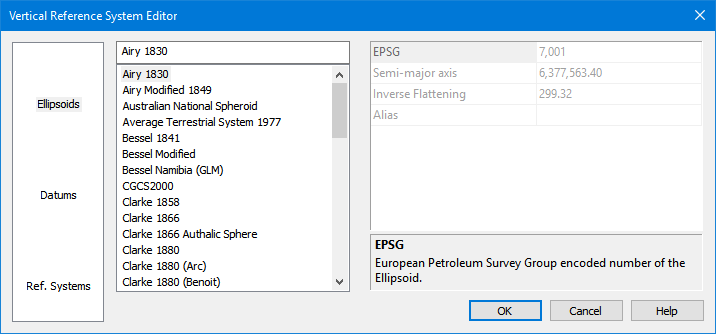
Option | Description |
|---|---|
Category | The categories of data. 1. Select a category. A list of items is displayed in the Items list. |
Items | A list of the ellipsoids, datums and reference systems included with the application. 1. Click an item to view its properties. New items can be added as follows:. 1. Right-click and select New from the pop-up menu. |
Properties | The properties of the selected item. The description panel at the bottom provides a brief description of the selected property. If you are creating a new item, this area is used to define its properties. |
Procedure: Create new vertical coordinate system
1. Select a category.
2. Right-click in the items list and select New from the pop-up menu.
3. Type a name for the new item.
If you do not name the new item, it will be called "New Item". You cannot change the name once you press <Enter>. |
A new item is added to the list of items.
4. Define the necessary properties.
Properties will differ based on the type of item being created.
If you do not define properties for the new item, it will be removed from the list when the editor is closed. |
5. Click OK.
The new item is saved to the database. It will now be available when assigning a vertical reference system to a dataset.
Procedure: Edit a vertical coordinate system
1. Select a category.
2. Select a user-defined item in the Items list.
3. Edit the necessary properties.
4. Click OK.
The changes are saved.
Procedure: Delete a vertical coordinate system
1. Select a category.
2. Right-click on a user-defined item in the Items list.
3. Select Delete from the pop-up menu.
You are prompted to confirm the deletion.
4. Click Yes.
5. Click OK.
The item is deleted.
1 Use of material from OGP Surveying and Positioning Committee’s EPSG Geodetic Parameter Registry does not imply endorsement by OGP Surveying and Positioning Committee of CARIS products or services.
