If you selected the user from the Root user group, a pop-up menu is displayed.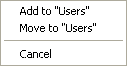
Users can be added to user groups from two locations:
• Users layer: A user is copied to the target user group but is still listed in the layer.
• Root users group: A user can be copied or moved to a user group. If a user is moved then it is no longer listed in the Root users group.
To add users:
1. Select a user in the Users layer or in the Root users group.
2. Drag the user to the Users layer in the new user group.
If you selected the user from the Root user group, a pop-up menu is displayed.
3. Select command from the menu.
The users are now copied or moved to the target user groups.