 CARIS HPD Paper Chart Editor
 CARIS HPD Paper Chart Editor
CARIS HPD Source Editor
CARIS S-57 Composer
CARIS Paper Chart Composer
Menu | Create > Lines > Parallel Line |
Tool |
|
Create a line that is parallel to an existing line.
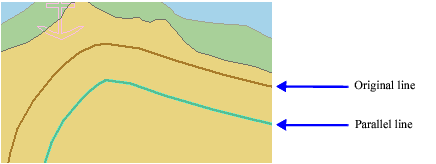
Parallel lines can be created at an approximate distance or an exact distance from the original line.
It is possible to create self-crossing lines using this command. Check for these using validation commands. See “Validation” on page 1149. |
This command uses the following Display Units options:
• Coordinate Measurements Reference
• Distance Units and Precision
See Options for details.
Results will generally be better using a projected coordinate reference system than with the Geographic (Lat/Lon) coordinate reference system which is not projected by definition. See Select Coordinate Reference System for information on selecting a coordinate system.
Related commands:
• • • • • | • • • • • |
Procedure
1. Select a line.
2. Select the Create Parallel Line command.
3. Select an acronym and set any necessary attributes as described in Create Features.
Approximate
1. Click on a point at the required distance and on the required side.
The parallel line is created but the command is still active.
2. [Optional] Click again as many times as required to create more parallel lines.
3. Reselect the Create Parallel Line command or press <Esc> to exit.
Specific
1. Select the Set Parallel Offset command.
Pop-up | Parallel Line > Set Parallel Offset |
Key | <Insert> |
The offset dialog box is displayed.
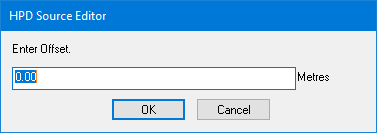
2. In Enter Offset, type a value in metres.
3. Click OK.
4. Click to one side of the selected feature.
The parallel line is created on that side. The command is still active.
5. [Optional] Click again as many times as required to create more parallel lines.
6. Reselect the Create Parallel Line command or press <Esc> to exit.
