 CARIS HPD Publications Module
 CARIS HPD Publications Module
Menu | Edit > Add |
Tool |
|
Pop-up | Add (Object Browser) |
Relations create associations between objects in a catalogue. These associations define the structure of the publication.
For example, a catalogue contains two objects:
• An NTC_GEN (General Notice) object.
• An NTC_GENERALINSTRUCT (General Notice Instruction) object.
The two objects are components of a publication but are not automatically associated. A relationship must be established between them.
In this case, the NTC_GENERALINSTRUCT must be linked to NTC_GEN to create a General Notice Instruction for a General Notice. NTC_GEN is the source or parent object and NTC_GENERALINSTRUCT is the target or child object.

There are three types of relations:
Relation | Description |
|---|---|
Association | The loosest relationship type that defines a simple connection between objects. No object is dependant on an other for its existence. There is no parent/child relationship. |
Aggregation | A relationship of an object to a collection of objects. The objects in the collection may also be included in other aggregations so that objects are shared. For example Notices can be included in more than one publication such as weekly notice publication and a quarterly re-issue of active notices. |
Composition | The parent or source object is made up of or composed of child or target objects. The objects in the composition are not shared with other objects. If the parent object is deleted then child objects are also deleted. |
Relationships within a catalogue should match the publication structure.
For additional information on catalogue relations, see Relations.
Related commands
• • • • • | • • • • • |
Procedure
1. Make sure that a catalogue is open.
2. Select the Relations layer in the Object Browser.
3. Select the Add command.
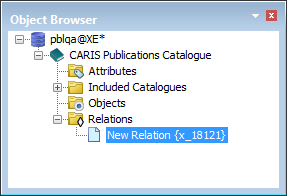
A New Relation object is created. The relation is listed in the Object Browser.
4. Complete the information in the Properties window.
Property | Description |
|---|---|
Type | The type of relationship between objects: • Aggregation • Association • Composition Select a type from the list. |
Code | This is relation name. The name is used as an XML tag. The following rules must be applied: • Names can contain alphanumeric characters • Names cannot start with a number or punctuation character • Names cannot start with • Names cannot contain spaces (use the underscore character to represent a space). Type a name in the field and <Enter>. |
Name | The name for the relation that will be displayed in the Object Browser. Type a name in the field and press <Enter>. |
Source Label | Label to be used in displays to represent the relation from the Source side. Type a value. |
Target Label | Label used in display to represent the relation from the target side. Type a value. |
Targets | The object that is set to be a child in an aggregation/composition relationship or an object in an association relationship. 1. Click Browse in the field. The Select Object Type dialog box is displayed. 2. Select an object. 3. Click OK. |
Sources | The object that is set to be a parent in an aggregation/composition relationship or an object in an association relationship. 1. Click Browse in the field. The Select Object Type dialog box is displayed. 2. Select an object. 3. Click OK. |
