Interface
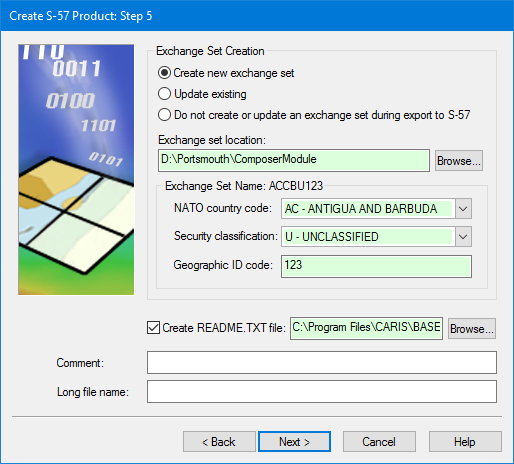
Exchange set dialog box for all AML 1.0 and AML 2.1 products:
Option | Description |
|---|---|
Exchange Set Creation | Select one of the following: • Create new exchange set: Create an exchange set. You must then define the location and name • Update existing: Update an existing exchange set by adding the new product to it. You must then define the location and name. • Do not create or update an exchange set: Do not create or update an exchange set. |
Exchange set location | The location of the exchange set. |
Exchange Set Name | The name of the exchange set is created from the following fields: • NATO country code: A two-character code to identify the producing country. Select from the list. • Security classification: The security level of the chart. Select from the list. • Geographic ID code: Geographic area identification. Type in the box. |
Create README.TXT file | The On: Off: No |
Comment | Additional information. Type in the box. |
Long file name | [Optional] A longer, more descriptive name for the exchange set. Type in the box. |
Procedure
1. Define any mandatory fields.
2. Define any other fields required by your agency.
3. Click Next.