
Select the product type.
Interface
Tab | Description |
|---|---|
All | All available product types. Two icons are displayed when you click on or hover over a product type. • • 1. Select a product type from the list. |
Recent | The product type used for products that have been created recently. Two icons are displayed when you click on or hover over a product type. • • 1. Select a product type from the list. |
Favourites | Product types that have been marked as favourites in the product list. 1. Select a product type from the list. |
Procedure
1. Select the product type.
2. Click Next.
 : Favourites. If this is yellow, the product type has been marked as a favourite. If it is grey, the product type has not been marked as a favourite. Click the icon to toggle from one to the other.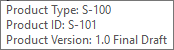
 : Information. Hover over the icon. A tooltip displays information about the product type.
 : Information. Hover over the icon. A tooltip displays information about the product type.