Menu | Edit > Lines > Reverse Direction |
Tool |
|
Menu | Edit > Lines > Reverse Direction |
Tool |
|
Change the direction of the edges of one or more selected lines. This may be needed if the line pattern is displayed in the wrong direction or on the wrong side of the line.
The direction of an edge is indicated in the Components window as Edge Forward or Edge Reverse. If you select an edge in the Components window, the edge is marked with red arrows in the Display window.
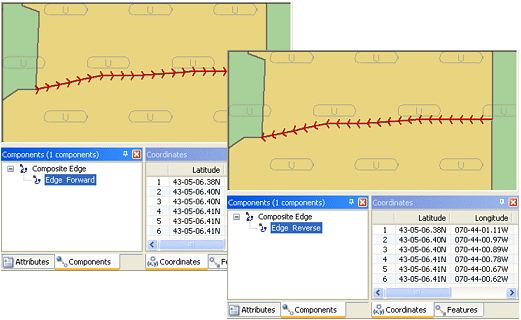
The actual direction of a line depends on the way it was digitized. For example, if a line is digitized in a general east to west direction, that is considered “forward” for that line.
Procedure
1. Select one or more lines.
2. Select the Reverse Line Direction command.
The result is displayed in the Output window.
The direction of all edges is reversed. In the Components window, forward edges are now “Edge Reverse” and reverse edges are now “Edge Forward”. In the Display window, the red arrows point the other way.
