Tool | CZMIL > 07 - Classify CZMIL Noise (Tools window) |
The Classify CZMIL Noise process model is used to assign a noise confidence value to all points in a CZMIL dataset. The dataset is run through a deep-learning algorithm that assigns a noise confidence value to points as it classifies them valid data or potential noise; the higher the noise confidence value, the more likely a point is noise and not data.
Once this classification is applied, a filter can be applied to reject any points identified as noise based on their noise confidence value. The filter can be applied at the time of classification or the Filter CZMIL Points process model can be run separately at any time. When applying the filter, points with a noise confidence value higher than the filter tolerance value are flagged as rejected.
Related commands:
CARIS Batch process: Classify CZMIL Noise
Interface
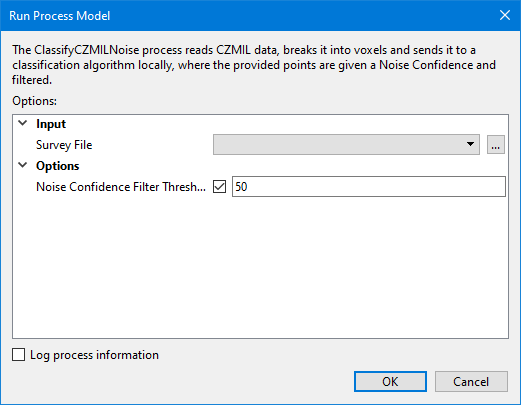
The options in this process model include:
Option | Description |
|---|---|
Survey File | The name and location of the survey file containing the survey lines of CZMIL data. If a survey file is open in the application, a drop-down list is also provided for this option. The drop-down list allows a survey layer open in the application or the current selection (if a survey line is selected) to be used as the input survey. 1. Click the browse button (...) to launch an Open file dialog box. 2. Navigate to the relevant file. 3. Click Open. |
Noise Confidence Filter Tolerance | The filter tolerance that will be used to determine whether or not points in the survey will be flagged as rejected. 1. Type a value in the field. |
Log process information | Create a log file containing the options specified when the process was run. The location of the log file is determined by the Logs setting in Tools > Options > Files and Folders. 1. Click the check box to enable this option. |
Procedure
1. Double-click the Classify CZMIL Noise process model in the Tools window.
The Run Process Model dialog box is displayed, populated with the Classify CZMIL Noise process model.
2. Navigate to the relevant Survey File.
3. Type a Noise Confidence Filter Tolerance value in the field.
4. Click OK.
A progress dialog box is displayed providing progress information as the data is analyzed and confidence values are assigned. Similar information is also reported in the Output window.
5. When finished, click the Close button to close the dialog box and complete the process.