Menu | View > Rejected Flag Types |
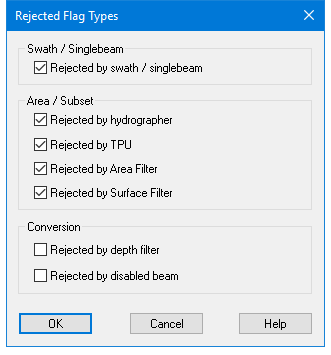
Control the display of specific types of rejected data in the Single Beam, Swath, and Subset Editors with the Rejected Flag Types dialog box.
Interface
Set display options in the Rejected Flag Types dialog box.
Option | Description |
|---|---|
Rejected by swath / single beam | View soundings rejected in Swath or Single Beam Editor or by the Swath or Single Beam filters. |
Rejected by hydrographer: | View data rejected interactively in Subset Editor by the hydrographer. |
Rejected by TPU | View soundings rejected through the Total Propagated Uncertainty filtering process. |
Rejected by Area Filter | View soundings rejected using a Bounding Polygon filter. |
Rejected by Surface Filter | View soundings rejected through surface filtering. |
Rejected by depth filter | View soundings rejected by the depth filter used in the Import Sensor Data process or when data is converted using the Generic Data Parser. |
Rejected by disabled beam | View soundings rejected due to a disabled beam status set during import, or when the sonar system flagged the beam as a bad detection in the raw data file |
Procedure
1. Select the View Rejected Flag Types command.
2. Place a check mark beside the box with the type of rejected data you want to view.
3. Click OK.