Menu | Edit > Edges > Repair Overshoots |
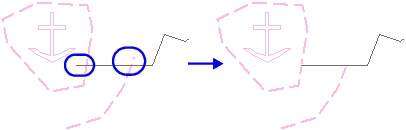
Trim an overshoot so that it intersects with another line.
An overshoot occurs when a line that is supposed to meet another line extends past it by a small amount.
Any overshoots equal to or less than a maximum acceptable length are deleted. Longer overshoots are ignored.
If the entire feature is shorter than the maximum acceptable length, the entire feature is removed. This change is applied to all features sharing the modified edge even if these features were not selected.
You may have to use the Intersect Edges command before repairing overshoots.
You can see a report before running the command. It tells you which edges will be removed, if any. Reports are displayed in the Output window and can be saved for later reference.
Related commands:
Procedure
1. Select two or more lines or areas.
2. Select the Repair Overshoots command.
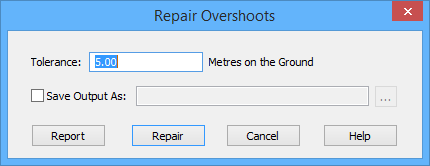
The Repair Overshoots dialog box is displayed.
Option | Description |
|---|---|
Tolerance | Edges equal to or shorter than this value are trimmed. Units are metres on the ground. 1. Type a value. |
Save Output as | On: The output of the overshoot repair will be saved to a file. Click browse (...) to select a file name and location. Off: No output report is saved. |
Report | Display a report in the Output window before any repair is done. The edges are listed by feature object ID Click the hyperlinks to select the edges in the Display window. The Zoom hyperlink gives a closer view of the edge. |
3. Type a value in the Tolerance field.
4. Set any other necessary options.
5. [Optional] Click Report.
The report is shown in the Output window.
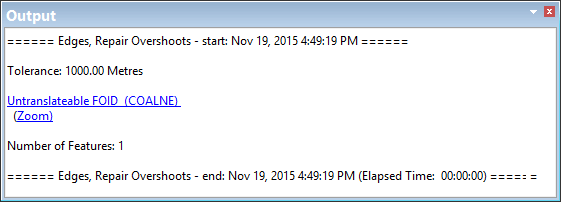
The Repair Overshoots dialog box remains open. If the tolerance is too small, you can enter a larger value and try again.
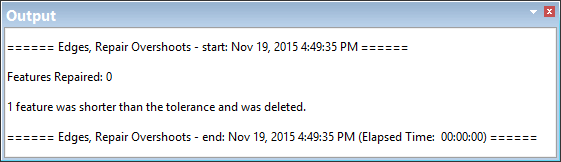
6. Once your results are acceptable, click Repair.
The repair results are shown in the Output window.
7. Click Cancel to close the dialog box.