Menu | Tools > Editors > Vessel |
Tool |
|
To open the Vessel Editor:
1. In HIPS and SIPS, click the Vessel Editor button on the Tools toolbar or select the command from the Tools menu.
The Vessel Editor window opens.
Menu | Tools > Editors > Vessel |
Tool |
|
2. Select the New Vessel File command.
Menu | File > New |
Tool |
|
The Vessel Wizard is displayed showing the Vessel Information page.
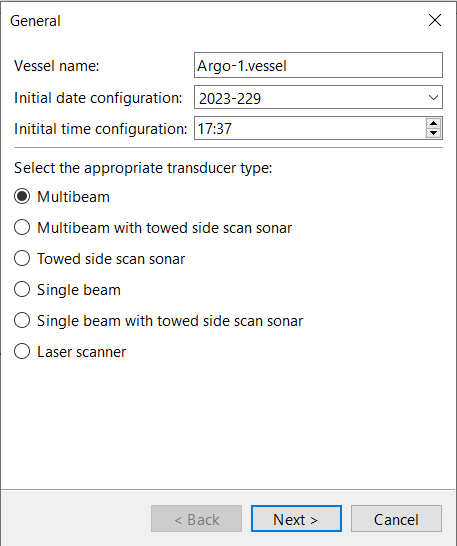
3. Enter a name to identify the vessel used in the survey into Vessel Name.
The name must not include any spaces.
4. Enter the time when the vessel was set up into the Initial Date Configuration and Initial Time Configuration fields.
This time must be before the start of your data collection. You can click the  button in the Initial Date Configuration field to set the date using a calendar.
5. Select the transducer type from the available options.
6. Click Next or Finish.
The button and the next step depend on which type of transducer you selected:
• For Multibeam and Multibeam with Towed Side Scan Sonar, click Next to go to the Manufacturers/Models/Formats page.
• For Towed Side Scan Sonar, there are no further screens, so the Next button is replaced by Finish. Click Finish to create the vessel file then select the Save command to save it.
• For Single Beam, Single Beam with Towed Side Scan Sonar, and Laser Scanner, click Next to go to the Other Settings page.

