Three sample format information files are provided with CARIS applications:
• asciinavigation++formatinformationfile.info
• asciinavigationformatinformationfile.info
• xyzformatinformationfile.info
These files can be found in the Template directory:
...\CARIS\HIPS\<version>\Template
The sample files can be used as a template that you customize to suit your data or you can create new format information files. Although a text editor could be used to review format information files, using the tools in the ASCII Info File Editor can simplify the process of editing and creating files.
Types of files
Two different types of format information files can be created:
• Elevation: This type should be used if opening or importing a file containing XYZ data.
• Navigation: This type should be used if creating a file for data containing location and time values. Navigation files are meant to be used in CARIS HIPS & SIPS only.
File formats
In addition to the file type, there is also an option for the file format. There are two different formats available:
• Fixed: A fixed format information file is used if the source data file has no delimiter between the attribute values. In this format, data is mapped according to the “Start” and “Width” values defined for each attribute column in the file.
• Delimited: A delimited format information file is used if the source data file uses a delimiter character to separate the attribute columns. With this method, the delimiter character identifies where attribute values start and stop.
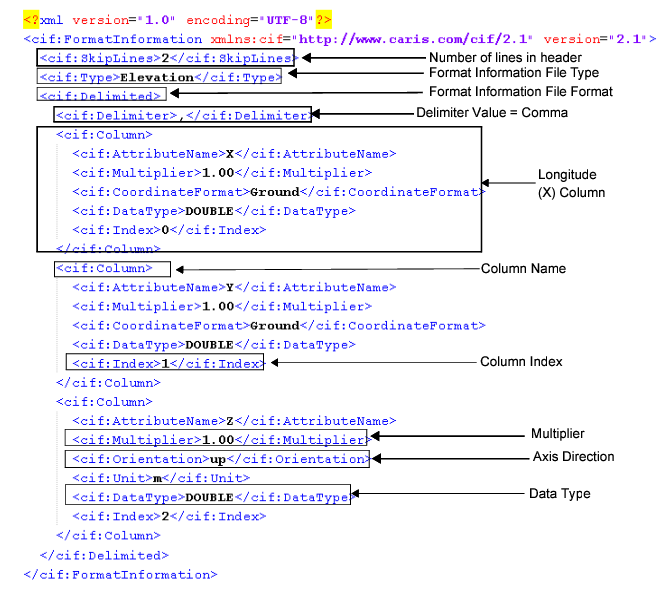
The following is an example of an elevation type information file in the delimited format:
Each of the fields highlighted in the example can be defined using the Properties fields in the ASCII Info File Editor.
See also INFO file.