Menu | View > Windows > TPU Analysis |
Use this tool to visualize the proportional effect of the various error sources that make up the TPU:
• component sources as contributions to horizontal or vertical TPU
• sources as a percentage of the total contributions, or as component values
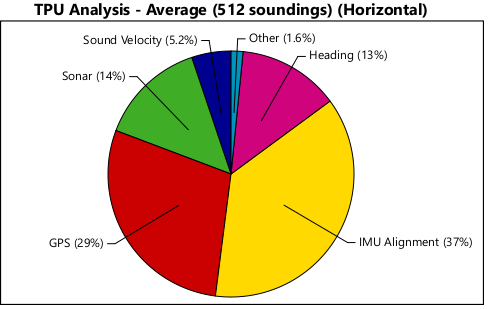
This can be displayed in pie chart, bar chart or scatter plot graphs. The default type is a pie chart. The TPU Analysis window example below displays a pie chart with the proportionate contributions of six error sources to horizontal TPU, as averaged over 512 selected soundings.
As well, the various error sources can be toggled on or off to see their impact.
To view TPU analysis for data:
1. Open the data to which TPU has been applied.
2. Open the TPU Analysis window.
3. Open Swath Editor, or load a subset of data in Subset Editor.
4. In an editor window, make a selection of data to which TPU has been applied, for example, in the Plan view in Swath Editor.
The TPU window will display a chart of the type last viewed.
To change the type of graph:
1. Right-click in the TPU Analysis window and select the type.
To change the data that is displayed in the graph:
1. Right-click in the TPU Analysis window and select or de-select the data to display.
2. [Optional] Turn of various sources to see their impact.
This information can be exported to a comma separated value text file, or to a TIFF, BMP, PNG or JPG image.