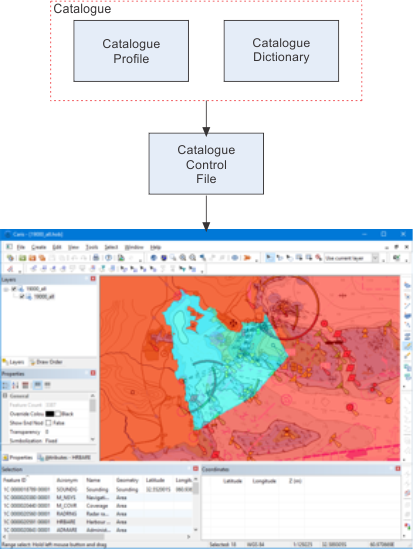
Features and attributes in CARIS products are defined through catalogues. A catalogue is composed of two components:
• a dictionary that defines what features and attributes are available for the product.
• a profile that links features and attributes, including relationships and allowed geometry.
Catalogues can be defined from specifications for official products, such as:
• S-57 ENC data
• Vector Product Data (VPF)
• S-57 and VPF Additional Military Layers (AML)
• CARIS Notebook Markers
• S-100 data
• SSDM
Catalogues can also describe features for any purpose.
CARIS modules access catalogues through the catalogue control file. This file links data in CARIS with the appropriate catalogue. The system catalogue control file is cataloguecontrol.xml
Do not modify existing catalogues. To create a new catalogue, copy information from existing files into new files or save existing files under new names. |
Existing catalogues can also be edited using the Catalogue Editor. See the CARIS application help for more information.
This diagram illustrates the relationship between catalogues and the catalogue control file.
This table lists the system products along with the dictionaries and profiles in the CARIS installation.
Product Types | Dictionaries | Profiles |
|---|---|---|
Bathy Database | s5731Pool.xml | BathyProfile.xml |
Interchange Feature Format | iffprofile.xml | iffpool.xml |
INT1 charts | chartFeatureDictionary.xml | chartFeatureCatalogue.xml |
Law of the Sea | S5731Pool.xml, LOSDictionary_1_0.xml | LOSProfile_1_0.xml |
Law of the Sea 2.0 | S5731Pool.xml, LOSDictionary_2_0.xml, aml10ExtensionPool.xml | LOSProfile_2_0.xml |
Markers | notebookmarkerspool.xml | notebookmarkersprofile.xml |
Notebook™ | s5731Pool.xml | notebookProfile.xml |
S-57 AML 3.0 | s5731Pool.xml and AML_3_0_ExtensionDict.xml | AML_3_0_Profile.xml |
S-57 bathymetric Marine Information Overlay (bMIO) | s5731Pool.xml | bmio_1_profile.xml |
S-57 Contour Line Bathymetry 1.0 | s5731Pool.xml and aml10ExtensionPool.xml | aml10CLBProfile.xml |
S-57 Contour Line Bathymetry 2.1 | s5731Pool.xml and aml21ExtensionPool.xml | aml21CLBProfile.xml |
S-57 Contour Line Bathymetry 3.0 | s5731Pool.xml and AML_3_0_ExtensionDict.xml | AML_3_0_CLB_Profile.xml |
S-57 Ed 3.0 ENC | s5731Pool.xml | s5731Profile.xml |
S-57 Ed 3.1 ENC | s5731Pool.xml | enc31Profile.xml |
S-57 Environment, Seabed, and Beach 1.0 | s5731Pool.xml and aml10ExtensionPool.xml | aml10ESBProfile.xml |
S-57 Environment, Seabed, and Beach 2.1 | s5731Pool.xml and aml21ExtensionPool.xm | aml21ESBProfile.xml |
S-57 Environment, Seabed, and Beach 3.0 | s5731Pool.xml and AML_3_0_ExtensionDict.xml | AML_3_0_ESBProfile.xml |
Inland ENC 2.0 | s5731Pool.xml and IENC_2_x_Dict.xml | IENC_2_0_Profile.xml |
Inland ENC 2.1 | s5731Pool.xml and IENC_2_x_Dict.xml | IENC_2_1_Profile.xml |
Inland ENC 2.2 | s5731Pool.xml and IENC_2_x_Dict.xml | IENC_2_2_Profile.xml |
Inland ENC 2.3 | s5731Pool.xml and IENC_2_x_Dict.xml | IENC_2_3_Profile |
Inland ENC Overlay 2.0 | s5731Pool.xml and IENC_2_x_Dict.xml | IENC_Overlay 2_0_Profile.xml |
Inland ENC Overlay 2.1 | s5731Pool.xml and IENC_2_x_Dict.xml | IENC_Overlay 2_1_Profile.xml |
Inland ENC Overlay 2.2 | s5731Pool.xml and IENC_2_x_Dict.xml | IENC_Overlay 2_2_Profile.xml |
Inland ENC Overlay 2.3 | s5731Pool.xml and IENC_2_x_Dict.xml | IENC_Overlay 2_3_Profile.xml |
Inland ENC 2.4 | s5731Pool.xml | IENC_2_4_Profile.xml |
Inland ENC 2.4 Overlay | s5731Pool.xml | IENC_2_4_Profile.xml |
S-57 Large Bottom Objects 1.0 | s5731Pool.xml and aml10ExtensionPool.xml | aml10LBOProfile.xml |
S-57 Large Bottom Objects 2.1 | s5731Pool.xml and aml21ExtensionPool.xml | aml21LBOProfile.xml |
S-57 Large Bottom Objects 3.0 | s5731Pool.xml and AML_3_0_ExtensionDict.xml | AML_3_0_LBO_Profile.xml |
S-57 Maritime Foundation and Facilities 1.0 | s5731Pool.xml and aml10ExtensionPool.xml | aml10MFFProfile.xml |
S-57 Maritime Foundation and Facilities 2.1 | s5731Pool.xml and aml21ExtensionPool.xml | aml21MFFProfile.xml |
S-57 Maritime Foundation and Facilities 3.0 | s5731Pool.xml and AML_3_0_ExtensionDict.xml | AML_3_0_MFF_Profile.xml |
S-57 Routes, Areas, and Limits 1.0 | s5731Pool.xml and aml10ExtensionPool.xml | aml10RALProfile.xml |
S-57 Routes, Areas, and Limits 2.1 | s5731Pool.xml and aml21ExtensionPool.xml | aml21RALProfile.xml |
S-57 Routes, Areas, and Limits 3.0 | s5731Pool.xml and AML_3_0_ExtensionDict.xml | AML_3_0_RAL_Profile.xml |
S-57 Small Bottom Objects 1.0 | s5731Pool.xml and aml10ExtensionPool.xml | aml10SBOProfile.xml |
S-57 Small Bottom Objects 2.1 | s5731Pool.xml and aml21ExtensionPool.xml | aml21SBOProfile.xml |
S-57 Small Bottom Objects 3.0 | s5731Pool.xml and AML_3_0_ExtensionDict.xml | AML_3_0_SBO_Profile.xml |
S-121 Maritime Boundary Exchange 0.0.1 | S100Config%\system\S-121\S-121_1_0_Dictionary.xml | S100Config%\system\S-121\S-121_1_0_Profile.xml |
Shoals | s5731Pool.xml, | ShoalsProfile.xml |
USACE Inland ENC 4.0 | s5731Pool.xml | USACE_iencprof40.xml |
VPF Contour Line Bathymetry | vpfFACC_2_1_dictionary.xml vpfUserDefinedDictionary.xml | vpfCLB_2_1_profile.xml |
VPF DNC Approach Library | vpfFACC_2_1_dictionary.xml vpfUserDefinedDictionary.xml | vpfdncapproachprof.xml |
VPF DNC Browse Library | vpfFACC_2_1_dictionary.xml vpfUserDefinedDictionary.xml | vpfdncbrowseprof.xml |
VPF DNC Coastal Library | vpfFACC_2_1_dictionary.xml vpfUserDefinedDictionary.xml | vpfdnccoastalprof.xml |
VPF DNC General Library | vpfFACCDictionary.xml and vpfUserDefinedDictionary.xml | vpfdncgeneralprof.xml |
VPF DNC Harbor Library | vpfFACC_2_1_dictionary.xml vpfUserDefinedDictionary.xml | vpfdncharborprof.xml |
VPF Feature and Attribute Catalogue | vpfFACC_2_1_dictionary.xml | vpfFACC_2_1_profile.xml |
VPF Tactical Ocean Data 0 | vpfFACC_2_1_dictionary.xml vpfUserDefinedDictionary.xml | vpfTOD0_2005_profile.xmll |
VPF Vector Smart Map | vpfFACC_2_1_dictionary.xml vpfUserDefinedDictionary.xml | vpfVMAPProfile.xml |
Because catalogue dictionaries and profiles are in XML, custom catalogues can be created.
Custom catalogues can be saved either with unique file names or with the same names as existing catalogues. A catalogue that is saved with the same name can contain new or extended information. Note, that this catalogue overrides the system catalogue. You should not overwrite existing catalogues.
Custom catalogues should be listed in a user-defined catalogue control file. This file works in parallel with the system catalogue control file so that files using custom catalogues can be displayed in a CARIS application along files using system catalogues.
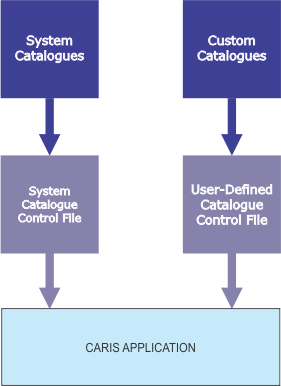
A custom Catalogue Control File can be selected from the Files and Folders section of the Options dialog box. Once selected, it can be applied to the application and the catalogues listed in the file are available in CARIS