CARIS HPD HPD Paper Chart Editor
 CARIS HPD HPD Paper Chart Editor
CARIS Paper Chart Composer
This command is only available if the BSB Chart Production module is enabled. |
Menu | File > Export > BSB |
Export a chart to a BSB raster chart.
These chart and panel attributes must be set before export:
Acronym | Attribute | Description |
|---|---|---|
Chart | ||
CHTNUM | Chart Number | Number of the chart. |
EDNUM | Edition Number | Edition number of the chart |
EDDATE | Edition Date | Date that the chart was created. The format must always be YYYYMMDD. |
Panel | ||
GRTINT | Graticule Interval | Latitude graticule interval in minutes (e.g. 300 is the numeric value for latitude graticule interval of 5°). |
PANTYP | Panel Type | Type of panel (e.g. Base or Inset). |
DEPUNT | Depth Units | Depth units for the panel. The value must exist in the depth_units.txt file. |
HGHTUN | Height Units | Height units for the panel. The value must exist in the depth_units.txt file. |
DEPDAT | Depth Datum | Depth datum of the panel. The value must exist in bsb_vertical_datums.txt. |
HGHTDA | Height Datum | Height datum for the panel. The value must exist in the bsb_vertical_datums.txt file. |
The following tables list line and point features specific to BSB export. Some are mandatory and others are optional. When all necessary features are completed, the sheet can be exported to BSB.
RNC Outer Limit | |
|---|---|
Acronym | $rncouter |
Spatial Type | Line |
Status | Mandatory |
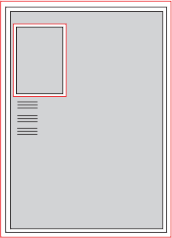
Description | An RNC Outer Limit ($rncouter) is a closed line that defines the extent of the KAP image. The line (shown in red below) is typically digitized around the edge of the sheet. If $rncouter is not rectangular then any outside areas are filled in white. When $rncouter extends outside the sheet then the sheet edge is used to define the extent for that section. The RNC Outer Limit for an inset panel is placed along the picture frame of the panel.
|
RNC Panel Boundary | |
|---|---|
Acronym | $rncpanel |
Spatial Type | Line |
Status | Mandatory |
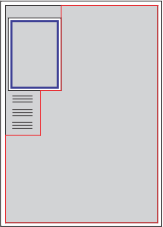
Description | An RNC Panel Boundary ($rncpanel) is required for each panel. It can follow a neatline or be traced around the navigable limit if some areas are not charted. If the sheet contains an inset panel, an RNC Panel Boundary is required within the neatline. An RNC Panel Boundary line for the main panel is shown below in red. The RNC Panel Boundary for the inset is shown in blue.
|
RNC Note Boundary | |
|---|---|
Acronym | $rncnote |
Spatial Type | Line |
Status | Optional |
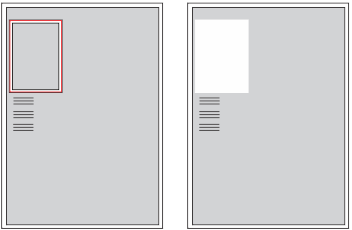
Description | An RNC Note Boundary ($rncnote) is a closed line that is digitized around a note image. The coordinates of the note image are stored in the BSB chart so that a BSB viewer can display notes on demand. Digitized note blocks are shown below in red.
The RNC Note Boundary feature contains a mandatory Note Key ($rncnotekey) attribute. The Note Key attribute is a three-character alphanumeric value that is a combination of codes from two files: For example, a $rncnotekey value of T20 means that the note relates to tidal information (T from The $rncnotekey value must correspond to codes in these two files or the chart cannot be exported. |
RNC Inner Limit | |
|---|---|
Acronym | $rncinner |
Spatial Type | Line |
Status | Optional |
Description | The RNC Inner Limit ($rncinner) is an optional rectangular line that masks the raster imagery of any panel inside the $rncouter line feature. More than one RNC Inner Limit feature can be added to a chart. The $rncinner feature is typically digitized just inside the thick outer border of the panel that is to be masked. This allows the masked outer border to be retained in the KAP image. An example of an $rncinner feature is shown below.
|
RNC Note Link | |
|---|---|
Acronym | $rncnotelink |
Spatial Type | Point |
Status | Optional |
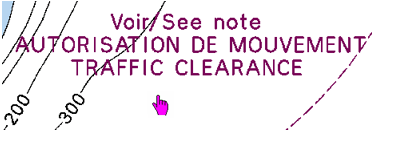
Description | The RNC Note Link ($rncnotelink) is a point feature that directs the user to relevant note information for that area. An example of an $rncnotelink feature is shown below.
The RNC Note Link also contains the Note Key ($rncnotekey) attribute. The Note Key attribute links the point location to the note record. In a BSB viewer, an image of the note is displayed when the cursor is positioned over the note link. The Note Key attribute value must match the Note Key attribute of the note that it is being linked. |
Interface
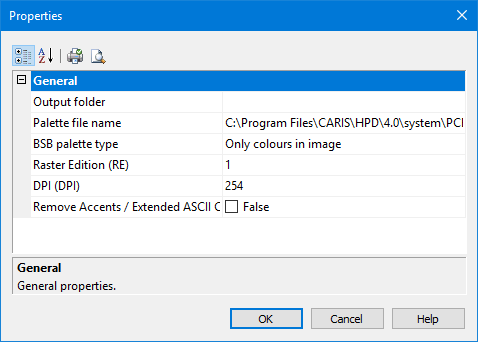
Property | Description |
|---|---|
Output File Folder | The path and name of the finished KAP file. |
Palette file name | The path and name of the BSB palette file used for colour definition in the BSB export. |
BSB palette type | Two options are available: • Only colours in image exports only the colours in the sheet. These colours are mapped to corresponding colours in the BSB colour palette. • All colours in BSB palette copies the contents of the palette listed in Palette File Name to the BSB export. |
Raster Edition | Edition of the BSB file. |
DPI | Resolution DPI for the BSB image. If not set, the default is 254. |
Remove accents/Extended ASCII characters | If set to True, accents and extended ASCII characters are omitted from text in the BSB chart. If set to False, text is exported as is to the BSB chart. |
Procedure
All open raster layers for the sheet are also exported to the file. The raster layers are exported first, before vector layers, regardless of display or draw order settings. |
1. In the Layers window, select the Sheet layer.
2. Select the Export to BSB command.
The Properties window is displayed.
3. Define any necessary properties and click OK.
The file is saved to the selected folder. The names of the BSB and KAP files are automatically generated from the CHTNUM (chart number) and PANNUM (panel number) attribute values.