 CARIS HPD Product Editor
 CARIS HPD Product Editor
CARIS S-57 Composer
Menu | Tools > Report > S‑57/S1-00 to ASCII |
Output a binary S‑57 or S-100 file to an ASCII format.
This command can be applied to a .000 file or to update files. You do not need to have a product open to use this command.
Related commands:
• • • • | • • • • |
Interface
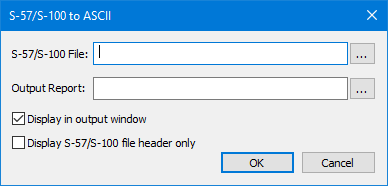
Option | Description |
|---|---|
S‑57/S-100 File | Select the S‑57 file, S-100 file, or an update file. Click browse (...). |
Output Report | If a path and file name is selected, the ASCII information will be saved to a text file. Click browse (...). |
Display in output window | On: The ASCII information will be displayed in the Output window. If an output file has been selected, the information will be displayed in both places. Off: The ASCII information will not be displayed in the Output window. |
Display S‑57/S-100 file header only | On: Display only the metadata for the S‑57 or S-100 file. Off: Display the entire file. |
Procedure
1. Select the Report S‑57/S-100 to ASCII command.
The S‑57/S-100 to ASCII dialog box is displayed.
2. Select the file.
3. Set any other necessary options.
4. Click OK.