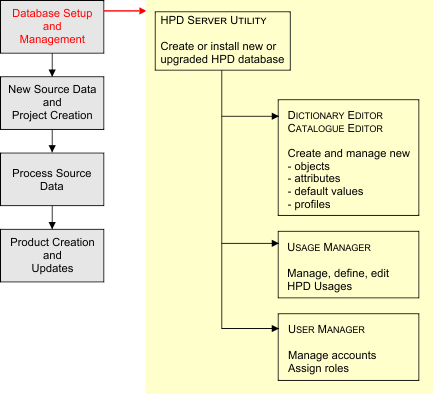
The typical HPD workflow contains the following processes:
• Database setup and management
• New source data and project creation
• Processing source data
• Product creation and updates.
These processes, and the tasks associated with them, are outlined below.
Database Setup and Management
These tasks are performed using the following HPD programs.
Task | HPD Program | Description |
|---|---|---|
Database Creation • Create new HPD database • Upgrade existing schema | HPD Server | HPD Server is used to create or upgrade an HPD database schema. |
Control Data Dictionary • Modify entries • Create entries | HPD Admin Tools: Dictionary Editor Catalogue Editor | These programs are used only rarely, to modify existing database objects and attributes or to create user-defined objects and attributes. |
User Accounts and Roles • Create, update • Create, modify subagencies | HPD Admin Tools: User Manager HPD Admin Tools: Subagency Manager | The User Manager is used to create, manage and edit HPD user accounts, including assigning roles and passwords. The Subagency Manager is used to control subagency settings that can be associated with user accounts. |
Database Usages • Update existing usages • Define new Usages | HPD Admin Tools: Usage Manager | The Usage Manager is used to modify existing database usages or to define new usages, preferably before loading data. |
Database setup and management information is located in Database Administration.
New Source Data and Product Creation
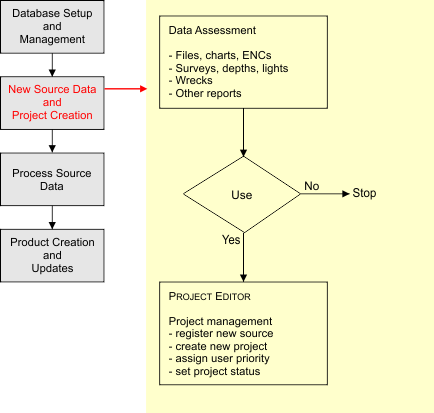
These tasks are performed using the following HPD programs.
HPD Task | HPD Program | Comment |
|---|---|---|
Set Up Project Information • Create, update, edit projects • Create, update, edit sources | Project Editor | The Project Editor is used to create and edit HPD projects and sources. This includes changing the status and adding completion information as tasks are finished. |
Analyze New Source Data • Define, update new source • Analyze new source data | Project Editor | Create new product sources when new data sources become available. The appropriate person must analyze the relevance of the new data and change the Source Use status flag to Use or Do Not Use. |
Load Source Data | HPD Data Loader Batch Loader | Load data using the HPD Data Loader or the command line batch loader. These can load S-57 files, CARIS standalone HOB files and DNC files into a database. |
Load External Files | External Files Utility | The External Files Utility lets you batch-load external files (associated with the PICREP and TEXDSC attributes) directly to the database. The database must be configured to accept external files. |
Processing Source Data
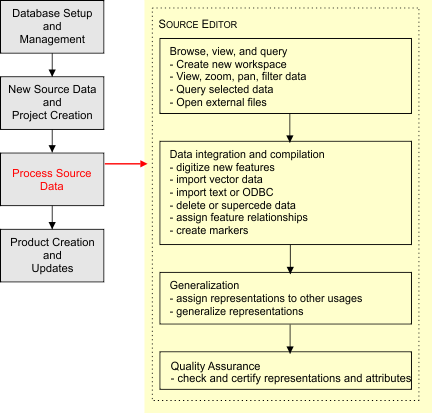
These tasks are performed by the following HPD programs.
HPD Task | HPD Program | Comment |
|---|---|---|
View Data Interactively • Draw, filter, query data | Source Editor | Source Editor is the main program used for viewing data in any HPD database. This includes filtering and querying data. |
Digitize New Source Data • Add data interactively | Source Editor | Source Editor lets you add new data interactively. |
Using Other Data Files • View external datasets • Grab external data • Import Selected Objects • Object Import Utility | Source Editor | Source Editor lets you view external vector and raster datasets with the HPD database. It can also create new data interactively by grabbing features from external vector datasets or by importing data using various HPD tools. |
Markers • Working with markers | Source Editor | Markers can be added to data to record note, QC comments and so on. |
Editing Existing Source Data • Edit, update, delete data | Source Editor | Source Editor lets you edit data interactively. |
Further Data Editing Tools | Source Editor | Source Editor contains a number of additional editing tools. |
Create Relationships • Feature • Collections | Source Editor | Source Editor can define relationships between database objects. |
Create Usages • Create representations • Generalize data | Source Editor | Source Editor lets you add or edit representations of data to other database usages. It also allows data to be generalized on other usages. |
Data Certification • Attribute certification • Representation status | Source Editor | Source Editor can assign certification flags to objects and their representations: Under Construction, Not Verified, Verified & Rejected. |
Product Creation and Updates

These tasks are performed by the following HPD programs.
HPD Task | HPD Program | Comment |
|---|---|---|
Import S-57 Files • import S-57 files | S-57 Dataset Utility | Use the S-57 Dataset Utility to import previous versions of an S-57 file to the database. This is necessary to export updates from Product Editor. |
Create Product • Add product-specific data • Validate and certify data • Export product | Product Editor Paper Chart Editor | Use Product Editor to create a product or use Paper Chart Editor to create a chart. Add, edit, and verify product-specific data, if any, and then export the final product. |
Update Source Data • Edit, update data • Update representations | Source Editor | Use the create and edit commands in Source Editor to update data. |
Data Certification • Certify new data • Recertify updated data | Source Editor | Use Source Editor to update the certification status. |
Update a Product • Product version control • Update product from source • Edit product-specific data • Recertify product data | Product Editors Paper Chart Editor | Use Product Editor to create a new version of a product, or use Paper Chart Editor to create a new version of a chart. Product-specific data can be added, edited and verified. |
Create an Updated Product • Export the updated product | Product Editor | The updated product is created in Product Editor. |