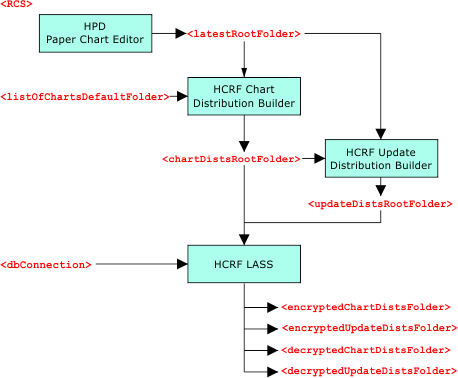
The RCS (Raster Chart Service) control file (rcsControl.xml) organizes files and folder related to HCRF production into raster chart services. These raster chart services can include HCRF image files, unencrypted chart distributions, LASS database connections, etc.
The file can list multiple raster chart services. For example, a raster chart service can be created for leisure craft and another for standard nautical charts.
Charts can neither be exported to HCRF nor can any HCRF utilities become operational until this file is set properly. |
RCS Workflow
The relationship between CARIS applications responsible for HCRF production and distribution and tags in RCS Control File is shown below.
An example of a simple RCS control file structure is shown below.
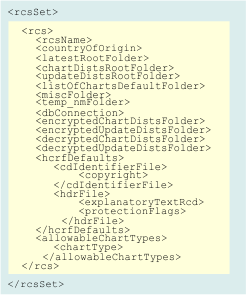
This table describes the tags in the file.
Tag | Description |
|---|---|
<rcs> | Raster chart service. This is a parent tag for the raster chart service. For example, charts for leisure craft can be organized in a leisure craft raster chart service. A single RCS control file can contain multiple raster chart services. |
<rcsName> | Name of the specific raster chart service. Example: <rcsName>LeisureCraftService</rcsName> |
<countryOfOrigin> | Country of origin. This is a 2-digit code that conforms to the HCRF country specification. Valid codes are found in the Example: <countryOfOrigin>GB</countryOfOrigin> |
<latestRootFolder> | Folder where the latest HCRF image files are stored. PCE exports HCRF image to this location. Example: <latestRootFolder>%USERPROFILE%\Documents\CARIS\HCRF Production System\RasterChartService\Latest</latestRootFolder> |
<chartDistsRootFolder> | Folder where unencrypted chart distributions are stored. The HCRF Chart Distribution Builder will put its distributions in this location. Example: <chartDistsRootFolder>%USERPROFILE%\Documents\CARIS\HCRF Production System\RasterChartService\Chart\Unencrypted</chartDistsRootFolder> |
<updateDistsRootFolder> | Folder where unencrypted update distributions are stored. The HCRF Update Distribution Builder will put updates in this location. Example: <updateDistsRootFolder>%USERPROFILE%\Documents\CARIS\HCRF Production System\RasterChartService\Update\Unencrypted</updateDistsRootFolder> |
<listOfChartsDefaultFolder> | Folder that contains the list of charts XML file. HCRF Chart Distribution Builder uses the list of charts file to create chart distributions. |
<miscFolder> | Folder where HCRF format support files are stored. These files are used by the HCRF Chart Distribution Builder and HCRF Update Distribution Builder. Example: <miscFolder>%PROGRAM FILES%\CARIS\HPD\<version>\system\HCRFConfig</miscFolder> |
<temp_nmFolder> | Folder where all Notice to Mariners files are stored. The HCRF Update Distribution Builder can use the files stored in this location. Example: <temp_nmFolder>%USERPROFILE%\Documents\CARIS\HCRF Production System\RasterChartService\TEMP_NM</temp_nmFolder> |
<dbConnection> | User names for connection to the LASS database. Multiple user names can be added and separated by a comma. Only the listed users can get access to the RCS. Example: <dbConnection>lass1,lass2,lass3</dbConnection> |
<encryptedChartDistsFolder> | Folder where encrypted chart distributions are stored. CARIS HCRF LASS stores encrypted chart distributions in this location. Example: <encryptedChartDistsFolder>%USERPROFILE%\Documents\CARIS\HCRF Production System\RasterChartService\Chart\Encrypted</encryptedChartDistsFolder> |
<encryptedUpdateDistsFolder> | Folder where encrypted update distributions are stored. CARIS HCRF LASS stores encrypted update distributions in this location. Example: <encryptedUpdateDistsFolder>%USERPROFILE%\Documents\CARIS\HCRF Production System\RasterChartService\Update\Encrypted</encryptedUpdateDistsFolder> |
<decryptedChartDistsFolder> | Folder where decrypted chart distributions are stored by CARIS HCRF LASS. Example: <decryptedChartDistsFolder>%USERPROFILE%\Documents\CARIS\HCRF Production System\RasterChartService\Chart\Decrypted</decryptedChartDistsFolder> |
<decryptedUpdateDistsFolder> | Folder where decrypted update distributions are stored by CARIS HCRF LASS. Example: <decryptedUpdateDistsFolder>%USERPROFILE%\Documents\CARIS\HCRF Production System\RasterChartService\Update\Decrypted</decryptedUpdateDistsFolder> |
<hcrfDefaults> | Section for comments and copyright statements. |
<cdIdentifierFile> | Section for comments and copyright statements. |
<copyright> | Copyright statement. The HCRF export in PCE will use this statement when creating an HCRF image, CD distributions and update distributions. Example: <copyright>The contents of this file and its associated files are copyright.</copyright> |
<hdrFile> | Parent element for |
<explanatoryTextRcd> | Special explanatory text. The HCRF export in PCE will use this statement when creating the HCRF image. Example: <explanatoryTextRcd>No special remarks for this chart.</explanatoryTextRcd> |
<protectionFlags> | The data protection record that needs to be written to the HDR file during export. For CARIS HCRF LASS when encrypting a distribution. Example: <protectionFlags>000000000</protectionFlags> |
<allowableChartTypes> | Parent element for |
<chartType> | The chart type for this RCS. This tag is used in conjunction with the chart-type attribute in HPD. The item set here must match one of the items in that attribute otherwise the chart is not exported. Example: <chartType>INT Chart</chartType> |