 CARIS HPD Paper Chart Editor
 CARIS HPD Paper Chart Editor
CARIS HPD Product Editor
CARIS HPD Source Editor
CARIS S-57 Composer
CARIS Paper Chart Composer
Menu | View > Swipe |
Tool |
|
The Swipe command splits the Display window into two panes so that you can compare the active layer to all other visible layers. Dividers can be moved up and down or left to right to control the display of the compared areas.
Related commands:
• |
Procedure
1. Make one layer active.
2. If necessary, zoom in to the area of interest.
3. Select the Swipe command.
Two dividers are displayed, one vertical, one horizontal.
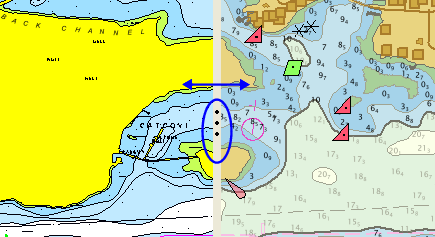
4. Grab the handles on the vertical divider and drag it to the left or right.
One side of the divider displays the active layer, the other displays all other open layers. You can drag back and forth to see differences between the layers.
5. Repeat using the horizontal divider.

6. Select the Swipe command again to finish.
