CARIS HPD Paper Chart Editor
 CARIS HPD Paper Chart Editor
CARIS HPD Product Editor
CARIS HPD Source Editor
Menu | Tools > Report > Events |
Generate a report of events, such as displaying, creating and deleting data, that occurred between any two dates.
This command applies to HPD database workspaces, projects, products and charts,
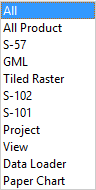
The following events can be selected.
Scope | Description |
|---|---|
All | Report all events. |
All Product | Report events for all products, whether exported or not. |
S-57 | Report events for S-57 database products, such as when a product is opened or edited or a new edition is created. |
GML | Report events for Geographic Markup Layer products, such as when a database product is opened, populated or exported, or a new edition is added. |
Tiled Raster | Report events for tiled raster products. |
S-102 | Report events for database S-102 products, such as when a product is opened, populated or exported, or a new edition is added. |
S-101 | Report events for database S-101 products, such as when a product is opened, populated or exported, or a new edition is added. |
Project | Report when a project is changed, such as when it is created, opened, edited, saved or deleted. |
View | Report when a workspace is opened or created. |
Data Loader | Report when bulk data is imported or loaded. |
Paper Chart | Report events for paper charts, such as when a chart is opened, populated or exported, or a new edition is added. |
Execute | Report when a project is created or edited. |
External |
Reports are saved in XML files. A sample is provided here.
This command requires administrator permissions.
Related commands:
• • • • | • • • • |
Interface

Option | Description |
|---|---|
Scope | The scope or type of the data that you want to report. By default, All is selected.. Select an option from the dropdown list. • |
Begin Date | Include events that occurred on or after this date. Select a date from the calendar that opens. |
End Date | Include events that occurred on or before this date. Select a date from the calendar that opens. |
Transformation File | [Optional] An XML transform file ( A sample transformation file is located in |
Output | Output file that contains the report. Click browse (...), navigate to a folder and type a file name. |
Procedure
1. Select the Report Product Events command.
The Report Events dialog box is displayed.
2. Set all options.
3. Click OK.
Event fields
Each event in the report file uses the following syntax. A sample report file is also shown.
Event Field | Description |
|---|---|
event_type | Event type. This is usually the same as the event scope. |
| Date and time of the event. |
| Associated HPD workspace, project, product or chart. |
| Record ID. For a product, chart or panel record, this is the productversion_id attribute. For a project record, this is the project_id attribute. |
| Record version. For a product, chart or panel, this is version "x.y" of the product. For a project record, the version is empty. |
| Action that took place, such as Open Workspace or Edit Project. |
| Description of the action and related information. |
| Associated HPD user. |