The RasterLayers.txt file determines the order that layers in a raster set are drawn and the colours represented on each layer. This file is located in C:\Program Files\CARIS\HPD\<version>\system\PCEConfig.
This is an example of the file:
BUFF Land_Area |
HBLU Depth_Area_Med_Shallow |
FBLU Depth_Area_Shallow |
DRYG Intertidal_Area |
TOWN Built_Up_Area |
ROAD Grey_20p |
TRAF Traffic_Separation_Magenta |
GAID Green |
YAID Yellow |
RAID Red |
BLUE Blue |
BATY Bathymetric_Contour |
AIDS Nautical_Purple |
BLPN Black |
The left column are layer names; the right column are colour tokens for each layer.When a raster set is opened in Paper Chart Editor, these layer names are listed in the Layers window in the same order as in the file.
Colours are read from a colour token palette file. This is normally ih_colour.xml. For more information on this file, see Colour Map.
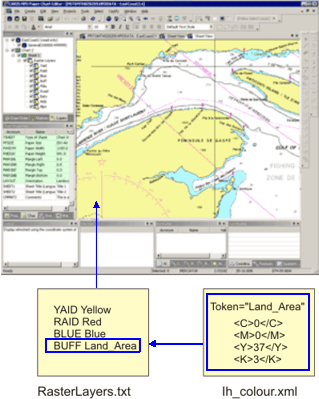
The relationship between the raster layers and colour files is shown below.
In the above image, the Land_Area colour token uses a CMYK colour code. This colour is represented by the BUFF layer.
The draw order of layers is with the first layer in the file being drawn first. From the example, this would be the BUFF layer. All other layers would be drawn on top of this layer. The BLPN layer is drawn last, on top of all of the other layers.