 CARIS HPD Publications Module
 CARIS HPD Publications Module
Menu | Publication > Publish Publication |
Tool |
|
Pop-up | Publish Publication (Object Browser) |
Set a publication as published.
The Published status is applied according to the publication type:
• Notices are set to read-only and can no longer be modified.
• List Records are set to read-only, but a new edition is generated. The new edition contains all the records of the previous edition and can be modified with updated information.
Related commands:
• • • • • • • • • | • • • • • • • • • |
Interface
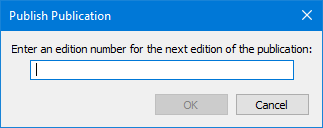
Option | Description |
|---|---|
Edition number | The next edition number. Type a value. |
Procedure
1. Select the publication.
2. Select the Publish Publication command.
If the publication is a list record, the Publish Publication dialog box is displayed
3. Type an edition number.
4. Click OK.
The notice publication is now read-only and the list record is iterated to the next edition.
