 CARIS HPD Publications Module
 CARIS HPD Publications Module
Menu | View > Compare Selected Objects |
Tool | |
Pop-up | Compare Selected Objects (Object Browser) |
Compare past and present changes to attributes.
This command is active only after the History command is run and the Previous Version folder is displayed in Object Browser
Related commands:
• • | • • |
Procedure
1. In the Object Browser, select two versions from the Previous Version folder (using <Ctrl> click).
2. Select the Compare Selected Objects command.
A new Compare Properties window is displayed.
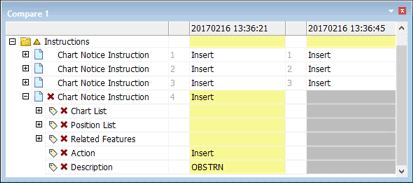
Rows represent attributes. The columns represents publication versions. The most recent version is shown on the right.
The rows highlighted in yellow show attributes that have changed between versions. The following symbols show the type of change:
• Delta (Δ) represents changes to existing attributes
• Plus (+) represents additions
• X represents deletions.
