Interface
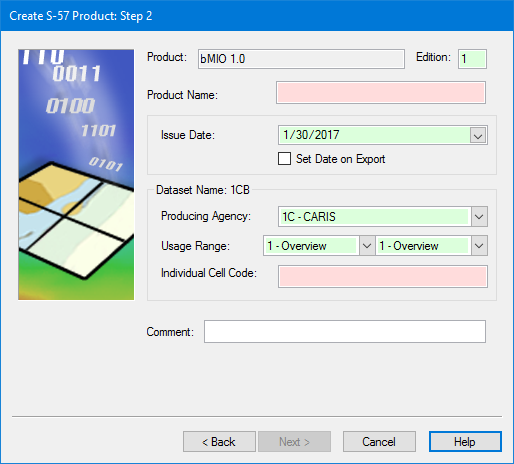
This dialog box, which is the only one supplied with the S-57 Composer module, is specific to bMIO products. User-defined MIO products will use a slightly different dialog box. |
Product information for MIO products:
Option | Description |
|---|---|
Product | [Read-only] The product type selected in Step 1. |
Edition | [Mandatory] The edition number of the product. Default is |
Product Name | [Mandatory] A name for the product. This does not have to follow the standard naming convention. |
Issue Date | [Mandatory] The issue date for the product. Defaults to the current date. Select another date from the calendar or enable Set Date on Export to assign the export date to the product. |
Dataset Name | [Mandatory] A name for the dataset which is built from the fields in the frame: • Producing Agency: A two-character code that designates the hydrographic agency that owns the data. Select from the list. • Usage Range: This determines the purpose and scale for the new dataset. The scale of the second usage must be equal to or greater than the scale of the first. Select from each list. • Individual Cell Code: A unique code for the product. |
Comment | Additional information. Type in the box. |
Procedure
1. Set all mandatory options or accept the default.
2. Set any other options required by your agency.
3. Click Next.