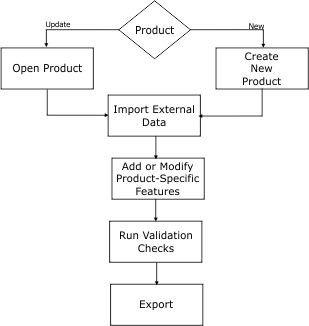
The typical workflow looks like this:
You would process data in the order of the tasks in the chart until data is ready for export. Most tasks are iterative, in that you repeat them until all relevant data is ready.
Task | General Procedure |
|---|---|
Create New Product | To create an S-57 product, use one of the following commands: • Create Product from S-57 Dataset • Create Product from Multiple S-57 Datasets To create an S-100 product, use one of the following commands: • Create Product from S-100 Dataset You can also open any background data file and use it as a template. |
Open Existing Product | Use File > Open and select either |
Import External Data | Import data into an existing product using any of the import commands (Import Selected Objects, Import as Update, Object Import Utility) or update a product that was created from multiple datasets using Regenerate Product. |
Add or Modify Product-Specific Features | Add or modify features using any of the create feature commands or import commands. You can also add parent/child relationships and collections. |
Run Validation Checks | Validate products using the following commands: Validation, Check Geometry, Difference Layers, and Generate Statistics |
Export | Export data to an exchange set using the S-57 Exchange Set Editor. Output a binary S‑57 or S-100 file to ASCII using the S-57/S-100 to ASCII command. Export selected features using any of the Export commands. |