Menu | Select > Features By > Feature Acronym |
Tool |
|
Menu | Select > Features By > Feature Acronym |
Tool |
|
Select all features that have a specific feature acronym.
Related commands:
Procedure
1. Select a layer.
2. Select the Select by Feature Acronym command.
The Select by Feature Acronym dialog box is displayed.
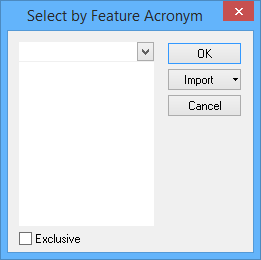
Option | Description |
|---|---|
Select the acronym | Select one or more acronyms using one of the following methods: • Type in the box. If any acronyms start with the letters you type, they will be displayed. • Click the down-arrow and select from the list. • Click Import and select From Clipboard. The contents of the clipboard are copied to the list. For this to work correctly, the clipboard must contain one or more acronyms, each acronym must be on a separate row and the entries must be in all upper-case letters. |
Exclusive | Off: The filter will select only the features that meet the criteria. On: The filter will select all features except those that meet the criteria. |
3. Type, select, or import the acronyms.
4. Click OK.
All features with the selected acronyms are selected.
