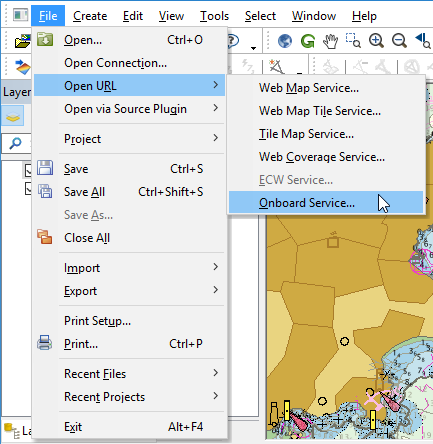
Some Teledyne CARIS applications can connect to the Onboard service, allowing data processed by Onboard to be monitored in real-time. The software includes:
• Easy View™ 4.1.16 and later,
• Bathy DataBASE1 4.1.16 and later, and
• HIPS1 and SIPS1 9.0.21 and later.
To determine if your Teledyne CARIS application supports the Onboard service, follow the instructions below. If the service is supported, you will be able to complete all the steps.
If the Teledyne CARIS application has been upgraded from a previous version, it will be necessary to run the Reset Default Layout command in order for the Onboard Service command to be displayed. Refer to the documentation for the Teledyne CARIS application for more information on this command. |
To connect to the Onboard service:
1. Select the File > Open URL > Onboard Service menu item.
You will be prompted with the Onboard connection dialog box.
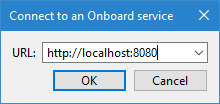
The URL of the Onboard service is:
http://<hostname>:8080
Replace <hostname> with the name of the host system. If you are accessing the Onboard Service through an application installed on the host system, <hostname> can be replaced with localhost.
2. Enter the URL for the Onboard service:
3. Click OK.
If more than one product has been registered with the Onboard service, a dialog box allows you to select the source you wish to view. 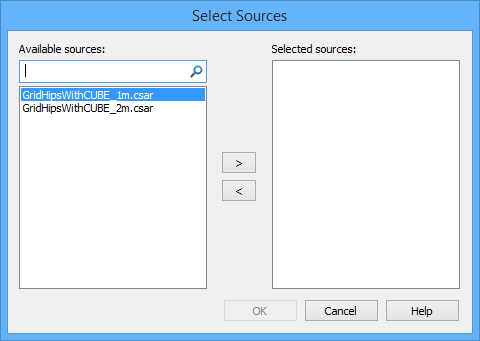
Only raster outputs will be listed as available sources. Jobs that result in track line data cannot be viewed through the service connection in a CARIS application. |
4. Select a source in the Available sources list.
5. Click the arrow button to move the sources you wish to view into the Selected sources list.
6. Click OK.
If you selected more than one source, each source will be displayed in the Layers window. You can select the layer of interest and refresh the screen to see the desired data.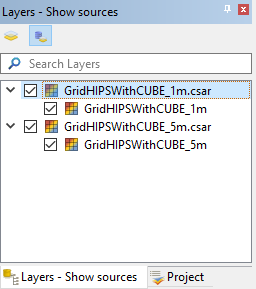
The view will automatically refresh, updating the surface each time new jobs are processed by the the Onboard service. 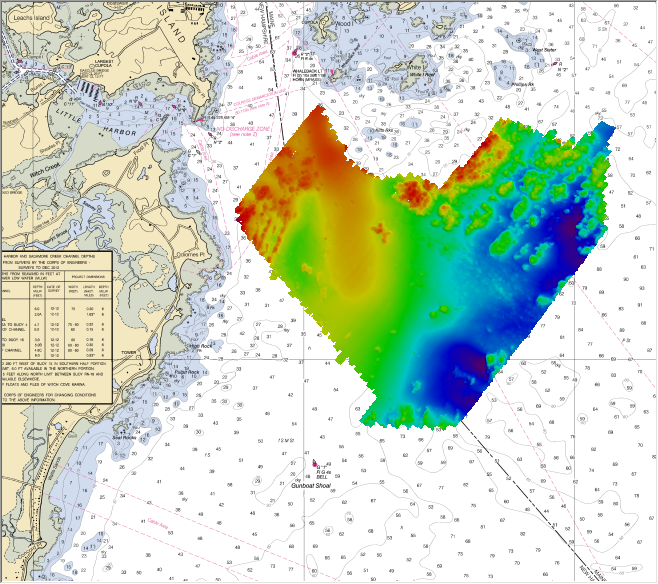
1 This term is a trademark of Teledyne CARIS Reg. USPTO.