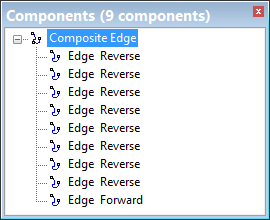
The Components window displays spatial information about a superselected feature.
1. To select a feature either:
• Click a single feature in the Display window, or
• Highlight a single feature from the list in the Selection window.
Component information is displayed in the Components window.
If the feature is a point, it has a single point component. If the feature is a line or an area, the components are edges. You can select individual edges in the Components window.
To select one or more edges:
2. Do one of the following:
• Click on the edge.
• Press <Ctrl> and click on several edges.
You can also select an edge in the Display window. Press and hold <C> and click on the edge of the superselected feature. The edge is highlighted in the Components window. |
The commands available for a selected edge will vary depending on the enabled modules.
To zoom and centre on a component in the Display window, double-click the entry in the Components window.