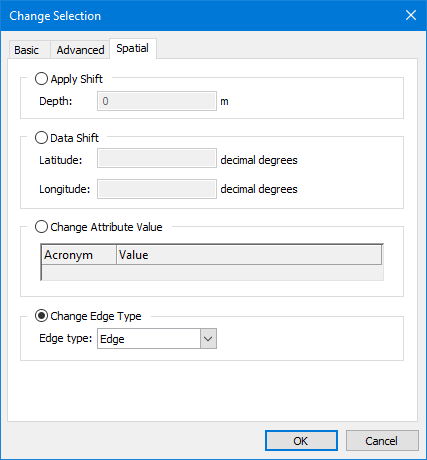
Option | Description |
|---|---|
Apply Shift | Apply depth shifts to soundings. The shift value can be negative or positive. 1. Enable Apply Shift. 2. Type the shift in metres in the Depth field. |
Data Shift | Shift selected features by latitude or longitude. Units are decimal degrees. If the features being shifted share geometry with other features, you must decide whether or not the change should also be applied to those features that share the geometry. The Shared Edit command controls whether changes to features will be carried over to shared features or not. When this command is enabled, all features will be changed; when this command is disabled, only the selected features will be changed. If the command is enabled when applying the shift, a message will be displayed identifying the features that will be affected. See Shared Edit for more information on this command. Warning: Shifting features that share geometry with other features could adversely affect your data. 1. Enable Data Shift. 2. Type shift values in decimal degrees. |
Change Attribute Value | Change values for Positional Accuracy (POSACC) and Quality of Position (QUAPOS) spatial attributes. The extent of the change is determined by the Shared Edit command. Applying the change with this command enabled will change the selected features and all features that share geometry with those features. If this command is disabled when the change is applied, only the selected features will be changed. If the command is enabled when applying the change, a message will be displayed identifying the features that will be affected. See Shared Edit for more information on this command. 1. Enable Change Attribute Values. 2. Select an attribute from the drop-down list in the Acronym column. 3. Type or select the value to apply to the selected features, depending on the selected attribute. |
Change Edge Type | Change the edge type of the selected features. The extent of the change is determined by the Shared Edit command. Applying the change with this command enabled will change the selected features and all features that share geometry with those features. If this command is disabled when the change is applied, only the selected features will be changed. If the command is enabled when applying the change, a message will be displayed identifying the features that will be affected. See Shared Edit for more information on this command. 1. Enable Change Edge Type. 2. Select from the list: • Edge: Convert a geodesic line or loxodrome to an edge. • Geodesic: Convert an edge or a loxodrome to geodesic. • Loxodrome: Convert an edge or a geodesic line to a loxodrome. |