Menu | Tools > Coverages > Modify >Tile Raster |
Pop-up | surface > Tile Raster (Layers window) |
The Tile Raster command exports a single raster to one or more raster files based on the defined tiling scheme. The resulting raster files will be in the *.csar format.
Interface
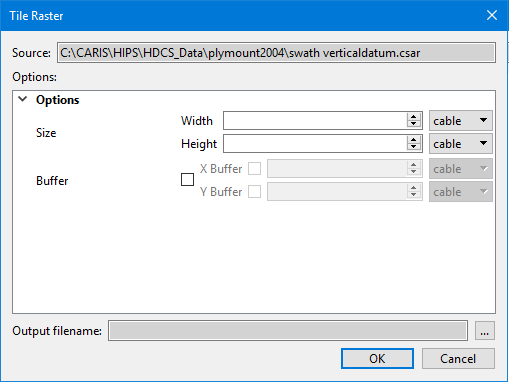
The Tile Raster command uses the following dialog box.
Option | Description |
|---|---|
Source | The input data for the process. The Source is defined by the surface that was selected at the time the command was initiated. This field cannot be changed. |
Size | The size of the tiles to be exported. 1. Use the Up or Down arrow buttons or manually enter a value for the Width and Height of each tile. 2. Select the unit of measure for each measurement. |
Buffer | The size of a buffer around exported tiles. X Buffer defines the size of the buffer on the left and right of each tile. Y Buffer defines the size of the buffer on the top and bottom of each tile. 1. Click the check box to enable the Buffer fields. 2. Click the check box for X Buffer to enable those fields. 3. Specify a size and select a unit of measure for the X Buffer. 4. Click the check box for Y Buffer to enable those fields. 5. Specify a size and select a unit of measure for the Y Buffer. |
Output filename | The name and location for the resulting tiles. The tiles are named based on the provided output name, with the row and column of the tile encoded into the name, such as outputfile2x3 for the tile in the second row and third column. |
Procedure
1. Select the root layer of the raster to be tiled.
2. Select the Tile Raster command.
The Tile Raster dialog box is displayed.
3. Define the Size and Buffer settings for the tiles to be exported.
4. Define a name and location for the tile files.
5. Click OK.
The raster is divided into tiles based on the specified dimensions and those tiles are saved as *.csar files in the specified location.