Menu | Tools > Engineering Analysis > Model > Verify Model |
The Verify Model command is used to verify that the requirements for all features and attributes in the selected reference model have been met (all of the features in the model are “complete”). Below is a list of the typical tests run to verify completeness of the features in a reference model:
Reference Model Object Type | Verification Test |
|---|---|
Point Features | No two points can be closer than the XY tolerance of the model. |
If a point is defined relative to an alignment, the alignment must be complete. | |
Line Features | Lines must contain at least 2 valid points. |
Depths must be defined for each point in a line. | |
The geometries of lines must be valid lines, with multiple distinct points. | |
Surface Features | Surfaces must contain at least 3 valid points. |
Surfaces must have 3 key depths defined. | |
Key depths in a surface must be assigned to valid points. | |
The geometries of surfaces must be valid areas, covering an area, not just a line. | |
All points in the surface boundary (Spatial tab) must be included in the surface in clockwise order. | |
If any alignments are used to define the shape of the edge of a surface, they must be complete. | |
If holes are present in a surface, they must be complete. | |
Supersurface Features | Supersurfaces must contain surfaces. |
Surfaces in a supersurface must be complete. | |
The geometry of supersurfaces must contain at least 3 points. | |
All of the surfaces in a supersurface must touch, either directly or through other adjacent surfaces. | |
Supersurfaces must not contain holes. | |
Surfaces in supersurfaces must not overlap. | |
Template Features | The geometries of templates must be valid, containing one or more areas with each portion covering an area, not just a line. |
Templates must contain surfaces. | |
Surfaces in the template must be complete. | |
Templates must not contain holes. | |
Surfaces in templates must not overlap. | |
Curved alignments must not be used to define the edge of a sloped surface in a template; surfaces must be planar. | |
The portion of a template that represents the model bottom must not contain disjoint surfaces. |
Procedure
1. Ensure that the correct model is set as active.
2. Select the Verify Model command.
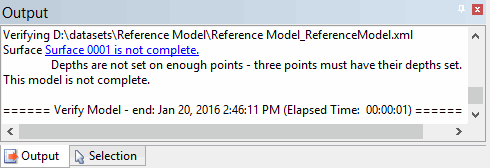
The results for any incomplete features are displayed in the Output window. Hyperlinks are provided to automatically superselect each incomplete feature.
When a hyperlink is clicked, the details for the feature will be added to the Selection window and the display will zoom and centre on the feature.