Menu | Tools > HIPS and SIPS > Beam Pattern > Offset |
Tool |
|
Menu | Tools > HIPS and SIPS > Beam Pattern > Offset |
Tool |
|
If there is a need to adjust the beam pattern to the observed data, you can use a dB offset.
The Beam pattern file must be visible in the Beam Pattern View in to order to see the effect of the offset on the curve.
1. Select the Set Beam Pattern Offset command.
The Beam Pattern Offset dialog box is displayed.
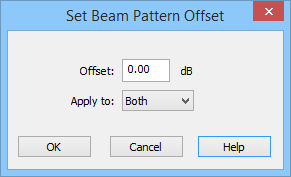
2. Enter an offset in dB. Values can be entered in negative numbers to move the curve.
3. Set to apply the offset to Port, Starboard or Both by selecting the values from the list.
4. Click OK to apply.
Menu | Process > Beam Pattern > Close |
Tool |
|
5. Click Close to close the beam pattern.

