
Command-line utilities in HIPS and SIPS are run at the command prompt. Current utilities are Dump and Printf functions and Other utilities.
The command line is activated either from the Windows Start menu or from the Interactive dialog box.
Procedure:
To open the command line from the Start menu:
1. Type HIPS at the Start menu (or in the Type here to search field).
2. Select the relevant command prompt such, as HIPS and SIPS 11.3 Command Prompt, from the displayed list.
This opens the HIPS Command Prompt window, which displays the name of the HIPS version in the window heading.
3. Type the command string using the correct syntax.
To open the command prompt from the Interactive dialog box:
1. Select the View > Toolbars > Interactive command.
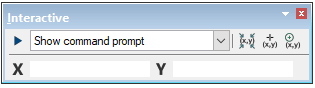
2. Select Show command prompt from the drop-down list.
3. Click the Run button  to open the command prompt.
4. Type the command string using the correct syntax.