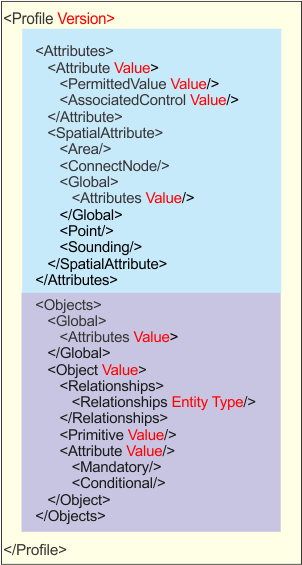
A profile defines relationships between features and attributes in a catalogue dictionary.
Custom profiles can be built – but these must conform to the structure and syntax of existing profiles Only one profile can be associated with a product.
The structure of a profile is shown below. Attributes are shown in red.
The file is divided into two sections: attributes and objects.
The profiles must begin with the following header.
<?xml version=”1.0” encoding=”UTF-8” standalone=”no”?> |
<Profile version=”1.0”> |
The following table describes the tags and associated attributes.
Tags | Description |
|---|---|
<Profile> | Root tag for all other elements in the file. Attribute:
Example: <Profile version=”1.0”> |
<Attributes> | The parent tag for all attribute elements. |
<Attribute> | Tag for individual attributes. Attributes:
• A: defines the individual characteristics of a feature • B: provides information for the relevant use of data • C: provides administrative information
Example: <Attribute subset="A" value="AGENCY"/> or <Attribute subset="A" value="CATDOC"> <PermittedValue value="1"/> <PermittedValue value="2"/> </Attribute> |
<PermittedValue> | The numeric value for enumerated or list-type attributes. This tag is not used with other attribute types (string, float, etc.). Attributes: value: the number value Example: see above |
<AssociatedControl> | The control used for selecting the attribute. For example, if the SORIND control is included, the Populate SORIND dialog box is used to enter SORIND information when the Browse button in the Attributes window is clicked. There are six • • • • • • Example: <Attribute subset="C" value="SORIND"> <AssociatedControl value="SORINDAttribute"/> </Attribute> |
<SpatialAttribute> | Parent tag for spatial attributes. Example: <SpatialAttributes> <ConnectedNode/> <Global> <Attribute value="POSACC"/> <Attribute value="QUAPOS"/> </Global> <Point/> <Sounding/> </SpatialAttributes> |
<Area> | Child tag for |
<ConnectNode> | Child tag for |
<Global> | Child tag for |
<Attribute> | Child tag for Attribute:
This tag can be applied to the |
<Point> | Child tag for |
<Sounding> | Child tag for |
<Objects> | Parent tag for all feature elements. |
<Global> | Parent tag for list of attributes attached to all features in the catalogue. |
<Attribute> | Child tag for the global attribute. Attribute:
Example: <Attribute value="NINFOM"/> |
<Object> | Parent tag for defining features, including the feature’s spatial type, relationship to other features, and associated attributes. Attribute:
Example: <Object value="ASLXIS"> <Relationships/> <Primitives value="L"/> <Attribute value="DATEND"/> <Attribute value="DATSTA"/> <Attribute value="NATION"> <Mandatory/> </Attribute> <Attribute value="NOBJNM"/> <Attribute value="OBJNAM"/> <Attribute value="NTXTDS"/> <Attribute value="PICREP"/> <Attribute value="SCAMAX"/> <Attribute value="SCAMIN"/> <Attribute value="TXTDSC"/> </Object> |
<Relationships> | Child tag for listing master-slave associations between features. Attributes:
Example: <Object value="BCNCAR"> <Relationships> <Relationship entity="DAYMAR" type="slave"/> <Relationship entity="LIGHTS" type="slave"/> <Relationship entity="FOGSIG" type="slave"/> <Relationship entity="RADSTA" type="slave"/> <Relationship entity="RDOSTA" type="slave"/> <Relationship entity="RETRFL" type="slave"/> <Relationship entity="RTPBCN" type="slave"/> <Relationship entity="SISTAT" type="slave"/> <Relationship entity="SISTAW" type="slave"/> <Relationship entity="TOPMAR" type="slave"/> </Relationships> ... </Object> In this example, features such as DAYMAR or LIGHTS are slaves of the cardinal beacon (BCNCAR) feature. |
<Primitives/> | A child tag to describe the feature’s geometry type. Attribute:
Example: <Primitives value="ALP"/> |
<Attribute> | Child tags for listing the attributes associated with the feature.
|
<Mandatory/> | A child tag that sets an attribute as mandatory. Example: <Object value="ADMARE"> ... <Attribute value="JRSDTN"> <Mandatory/> </Attribute> ... </Object> |
<Conditional/> | A child tag sets an attribute as conditional. The value depends on values assigned to other attributes. Example <Object value="BRIDGE"> ... <Attribute value="CATBRG"> <Conditional/> </Attribute> ... </Object> |