Interface
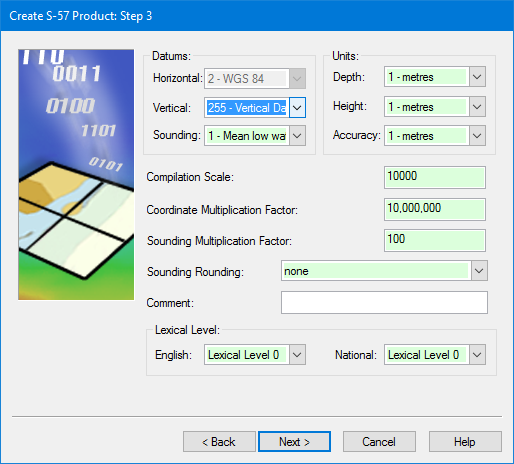
Header information dialog box:
Option | Description |
|---|---|
Datums | Select the datums for the product. • Horizontal: [Read-only] The horizontal datum. • Vertical: [Mandatory] The vertical datum. Select from the list or accept the default. • Sounding: [Mandatory] The sounding datum. Select from the list or accept the default. |
Units | Select the units and accuracy for depth and height in the product. • Depth: [Mandatory] Select from the list. • Height: [Mandatory] Select from the list. • Accuracy: [Mandatory] Select from the list. |
Compilation Scale | [Mandatory] The scale for the product. Type a scale denominator. |
Coordinate Multiplication Factor | [Mandatory] This is used to convert floating point values to integers, to avoid potential problems in the way computer platforms interpret floating point values. It is chosen by the data producer and is applied to the entire data set. Usually, it is based on the resolution of the source data set. If no value is entered, a default of |
Sounding Multiplication Factor | [Mandatory] This is used to convert a floating point three-dimensional sounding value to an integer (and vice versa) to avoid potential problems in the way computer platforms interpret floating point values. The default value is chosen by the data producer. If no value is entered, a default value of |
Sounding Rounding | [Mandatory] The rounding method used for sounding values. Select from the list. |
Comment | Additional information. Type in the box. |
Lexical Level | [Mandatory] Lexical levels indicate which character sets are used in product attributes. Most attributes must be defined in English. National language attributes can contain equivalent names in other languages. • Lexical Level 0: English-language letters, numbers, and special characters such as dollar sign, spaces and brackets. • Lexical Level 1: Lexical Level 0 plus extended characters, such as French accents and operands. • Lexical Level 2: Unicode text (two-byte characters) which support languages such as Chinese or Russian that cannot be supported by Lexical Level 1. |
Procedure
1. Define any mandatory fields.
2. Define any other fields required by your agency.
3. Click Next.