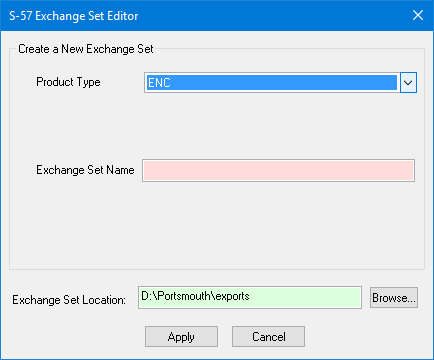
The S-57 Exchange Set Editor can be used to create a new exchange set. During creation, an exchange set folder, including an ENC_ROOT folder for the ENC, is created in the selected location. Other files can be included using the Add File command. The exchange set also includes a table of contents file, called CATALOG.031, that is created automatically.
A separate dialog box is used to create a new exchange set. The options in the dialog box change based on the type of product being created. The available product types are:
• AML
• AML 3.0
• ENC
• IENC
• IENC Overlay
• MIO
The options for each product type are explained below.
Interface: AML 3.0, ENC, IENC, IENC Overlap, MIO
Option | Description |
|---|---|
Product Type | The type of product to be created. |
Exchange Set Name | The name assigned to the exchange set. This can be any alphanumeric combination. Type the name in the box. |
Exchange Set Location | Click Browse and select a location for the exchange set. |
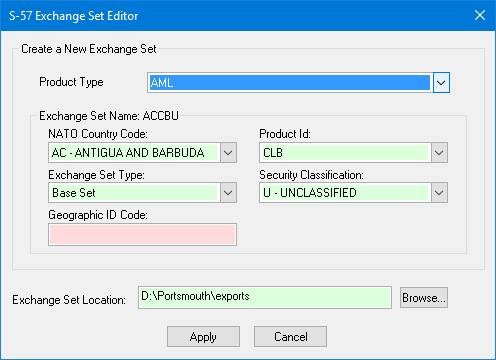
Interface: AML
Option | Description | |
|---|---|---|
Product Type | The type of product to be created. | |
Exchange Set Name | The name for an AML exchange set, which is generated from the values selected for the options in this group. | |
NATO Country Code | A code used to identify the producing country. This forms the first two characters of the exchange set name. | |
Product ID | The AML product type. This forms the third character of the exchange set name. | |
Exchange Set Type | The type of exchange set. This forms the fourth character of the exchange set name. | |
Security Classification | The security classification of the exchange set. This forms the fifth character of the exchange set name. | |
Geographic ID Code | A user-defined value identifying the area represented by the data in the exchange set. This forms the last three characters of the exchange set name. | |
Exchange Set Location | Click Browse and select a location for the exchange set. | |
Procedure
1. Click Create New.
The dialog box is opened to create a new exchange set.
2. Select a Product Type from the drop-down list.
3. Define all necessary options.
4. Specify a location for the resulting files.
5. Click Apply.
You are returned to the S-57 Exchange Set Editor. Your new empty exchange set is displayed in the file name box at the top.