Menu | Tools > Report > Check Geometry |
Check for dangling edges, overshoots, and undershoots.
• Dangling edges are edges that are linked to another edge at one end only.
• Overshoots are line segments formed when two lines intersect, but one line extends past the intersection.
• Undershoots are edges that should intersect with other edges but don’t. The undershoot has one end connected to a node and the other end dangling near another edge. As a result, a node is not formed.
If an edge crosses a line but does not intersect it, the edge is reported as an undershoot even though it visually extends beyond the line.
This command finds any edges that meet the above criteria and lists the information in the Output window. If you select an edge in the Output window, information about the edge is displayed in the other windows. You can use the Selection window to zoom in on an edge and manually repair it.
Related commands:
Procedure
1. Select the Check Geometry command.
A message tells you that the Output window will be cleared.
2. Click OK.
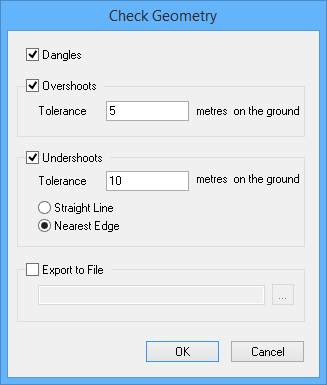
The Check Geometry dialog box is displayed.
Option | Description |
|---|---|
Dangles | On: The command will check for dangling edges. Off: The command will not check for dangling edges. |
Overshoots | On: The command will check for overshoots. The Tolerance option becomes active. • Tolerance: The maximum length of the overshoot. Lines longer than this value will be considered valid. Type a length in metres on the ground. Off: The command will not check for overshoots. |
Undershoots | On: The command will check for undershoots. The Tolerance, Straight Line, and Nearest Edge options become active. • Tolerance: The maximum distance between the end of a line and the line it should intersect. Gaps longer than this value will be considered valid. Type a distance in metres on the ground. • Straight Line: The final segment of the short line will be extended in a straight line until it meets another line. • Nearest Edge: A new segment will be added and extended to meet the nearest line. Off: The command will not check for undershoots. |
Export to File | On: The report will be saved to a text file. Click browse (...) and select a path and file name. Off: The report will be displayed in the Output window only. |
3. Select the types of errors to check.
4. Set any other necessary options.
5. Click OK.