Pop-up | Line Digitizer > Geodetic Circle [2 diameter point] Area Digitizer > Geodetic Circle [2 diameter point] |
Use with the Create Line Feature or Create Area Feature command.
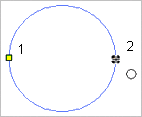
A geodetic circle defined by the length of its diameter.
Related commands:
Procedure
1. Select the Digitize Geodetic Circle Using Two Point Diameter command.
2. Click the first point on the diameter.
3. Press and hold the left mouse button.
4. Drag the cursor to expand the circle to an appropriate size.
5. Release the mouse button (2).
You can click directly on point 2 but pressing and dragging will give you a preview of the circle. |
The geodetic circle is created.