Menu | File > Export > Selection > GeoPackage |
Menu | File > Export > Selection > SQLite |
Export a selection of features to one of the following file types:
• GeoPackage: creates a new GeoPackage database file using the geometry and attributes of the selected features.
• SQLite: creates a new SQLite/SpatialLite database file using the geometry and attributes of the selected features.
Related commands:
Interface
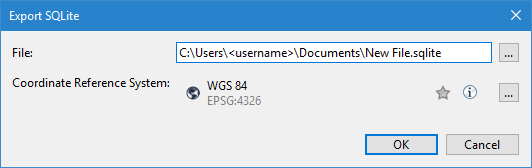
These Export Selection commands use the following dialog box.
Option | Description |
|---|---|
File | The name and location for the resulting file. An appropriate file extension is selected automatically according to the command that was selected. 1. Click the browse (...) button. 2. Define a name and location for the file. 3. Click Save. |
Coordinate Reference System | The coordinate reference system (CRS) of the output database file. The data is transformed to this CRS as part of the export process. 1. Click the browse (...) button to launch the Select Coordinate Reference System tool. See Coordinate Reference System Selection for information on this tool. 2. Select a CRS. 3. Click OK. |
Procedure
1. Select the input source in the Layers window.
2. Select the features to be exported.
3. Select the relevant Export Selection command.
The Export dialog box is displayed.
4. Define a name and location for the resulting file.
5. Select a CRS for the output.
6. Click OK.
The selected features are exported to a new file in the user-specified location.