Menu | Edit > Relationships |
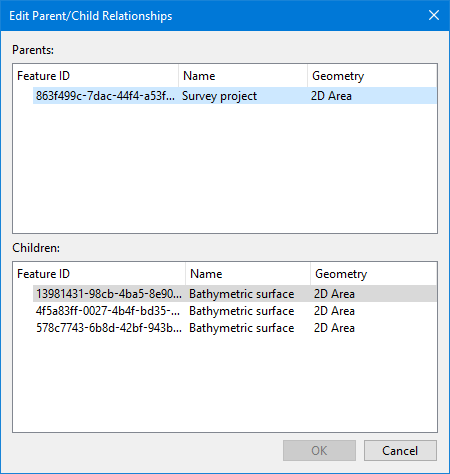
The Edit Relationships command is used to select and view the relationships in a database and make any necessary edits to those relationships. When this command is launched, the Edit Parent/Child Relationships dialog box is displayed, populated with all relationships that have been created in the database to which you are connected. The parent and child items in the panels of the dialog box can be used to create a selection or remove children from a parent object.
The objects that can be designated as a parent or a child are controlled by the catalogue of the database. These designations can be changed in the catalogue if needed. Edits to a catalogue are performed in the Catalogue Editor application. If changes are made, the updated catalogue must be uploaded to the database to make the changes available in BASE Editor. Uploading a catalogue to a BDB Server database is performed in the BDB Administration Tools. Refer to the documentation for these products for further information.
Related commands:
• Create Relationships
Interface
The Edit Relationships command uses the following dialog box.
Option | Description | |
|---|---|---|
Parents | This section of the dialog box lists all parent objects found in the selected database. Right-clicking an object in this section displays a pop-up menu with commands for interacting with the selected object. | |
Add to Selection From | The commands in this sub-menu allow you to add features to an existing selection. Any features that were already selected will remain selected. You have the option of adding either the highlighted parent object, all parent objects or the children of the highlighted parent object. | |
Create Selection From | The commands in this sub-menu allow you to create a new selection from either the highlighted parent object, all parent objects or children of the highlighted parent object. If features were already selected at the time this command is used, the previous selection will be cleared and replaced with the new selection. | |
Delete Parent/Child Relationship | This command is used to remove the parent/child relationship between the highlighted parent object and all of its children. | |
Children | This section of the dialog box lists the child objects of the parent object selected in the top half of the dialog box. Right-clicking an object in this section of the dialog box displays a pop-up menu with commands for interacting with the selected object. | |
Add Child to Selection | This command is used to add the currently highlighted child object to an existing selection. Any features that were already selected will remain selected. | |
Create Selection from Child | This command is used to create a new selection from the currently highlighted child object. If features were already selected at the time this command is used, the previous selection will be cleared and replaced with the new selection. | |
Remove Child from Parent | This command is used to remove the currently selected child object from the parent/child relationship. Any other children in the relationship will remain unchanged. | |
Procedure
1. Select the database connection layer in the Layers window.
2. Select the Edit Relationships command.
The Edit Parent/Child Relationships dialog box is displayed.
3. Select a parent or child object in the relevant section of the dialog box.
4. Right-click the selected object and select the relevant command.
5. Click OK to close the dialog box.