Menu | Tools > Editors > Vertical Reference System |
Tool |
|
Menu | Tools > Editors > Vertical Reference System |
Tool |
|
The Vertical Reference System Editor allows users to access the Spatial Reference Database (spatialref.db) for the application. This database contains the vertical reference systems that can be assigned to datasets in the application.
A reference system consists of an ellipsoid and/or a datum, a unit of measure and a Z-axis convention. There are numerous ellipsoids and datums available for a reference system, each having different properties. Through this editor, you can view the properties of existing vertical reference systems or create/edit custom systems. The systems already defined in the application originate from the European Petroleum Survey Group (EPSG) database of reference systems, which can be found at: http://www.epsg-registry.org/1
These reference systems are read-only. A new reference system can be created from either new, custom ellipsoids and datums, or from existing ones.
Interface
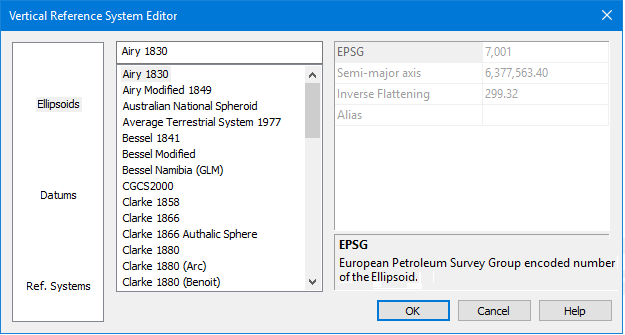
The Vertical Reference System command uses the following editor.
Options | Description |
|---|---|
Category | The categories of data available for viewing. Select a category to populate the Items List with the items available for the category. |
Items List | The items provided with the application for the selected category. Click an item to view its properties. New items can also be added to the list. |
Properties | The properties of the item currently selected in the Items List. The description panel at the bottom of the properties table provides a brief description of the currently selected property. If creating a new item, this table is used to define the properties for the item. |
Procedure: Create a New Item
1. Select a category.
2. Right-click in the Items List.
3. Select the New command.
4. Type a name for the new item.
It is not possible to rename a new entry later, so you must assign a name for the new entry before selecting another item. |
A new entry is added to the list of items for the selected category.
5. Populate the necessary properties for the entry. These fields will change based on the type of item being created.
If you do not define properties for the new item, it will be removed from the list when the editor is closed. |
6. Click OK.
The new item is saved to the database and will now be available when assigning a vertical reference system to a dataset.
1 Use of material from OGP Surveying and Positioning Committee’s EPSG Geodetic Parameter Registry does not imply endorsement by OGP Surveying and Positioning Committee of CARIS products or services.
