The Onboard360 installer is used to install the various applications available in the Onboard360 suite, which contains CARIS Collect, CARIS Processing and a set of common components.
• CARIS Processing is a collection of components that consists of:
• Process Designer: This is a stand-alone application that builds process files used to run processes for the Onboard Service.
• Onboard Service: This is a Windows service that monitors raw data files from the acquisition system and runs process model files on survey data.
• Control Centre: This is the interface used to initiate process models and monitor the data processed by the Onboard Service.
• Onboard Viewer: This is a desktop application that provides users with an interface to connect to the Onboard service and view data as it is processed in Control Centre.
• CARIS Collect is a web-based application used for the acquisition of data.
A step is provided in the installer to identify which applications will be installed during the installation process. See Install the Application for more information.
Onboard Versions
Only one version of Onboard360 can be installed at a time. If installing an upgrade with a previous version currently installed, the location of the existing installation will automatically be selected as the default installation directory for the upgrade.
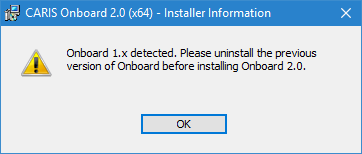
If a version of Onboard older than 2.0 is installed on the machine, it must be uninstalled manually before the latest version can be installed. It is recommended that any custom support files be backed up outside of the installation location prior to uninstalling the older version. If the installer detects an older version of Onboard on the machine, the following message will be displayed.
1. Click OK to close the message and cancel the installation.