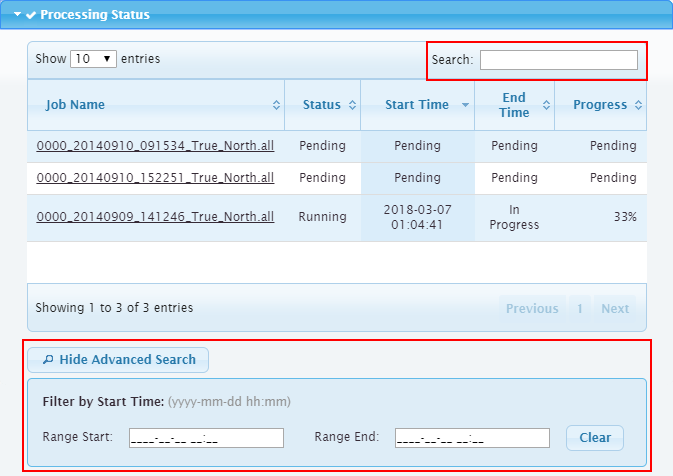
The Processing Status panel provides two tools for searching the job database, which is a record of all data files that have been processed by the Onboard service.
The basic Search field in the top-right corner of the panel looks for any job that matches a user-secified search phrase. The search phrase can be any textual phrase. The list of jobs will be filtered automatically to display any job that matches at least one word in the search phrase.
The Advanced Search is used to query the job database for all jobs started during a specific time period. Only jobs started during the specified time frame will be included in the list. This includes both completed and running jobs.
To perform a query with the Advanced Search tool:
1. In the Range Start field, enter the earliest date for which you want to display jobs. The date of the oldest job in the log files is used by default.
2. In the Range End field, enter the most recent date for which you want to display jobs. The current date and time is used by default.
Times must be specified in UTC format. The default values can be used as an example when entering search criteria. |
The list will be updated to display only jobs matching the specified search criteria.
The details of the job can be displayed by clicking the job name in the list. This will open the Job Details dialog box with information about the selected job. See Job Details for more information.