Menu | Tools > Engineering Analysis > Shoals > Merge Boxes |
Tool |
|
Menu | Tools > Engineering Analysis > Shoals > Merge Boxes |
Tool |
|
The Merge Boxes command is used to merge adjacent shoal boxes into a single box. Shoal merging might be done if:
• The Automatic shoal merging and subdividing option was not used during shoal detection.
• A shoal was not merged during detection because it did not meet the criteria.

When selecting shoal boxes to be merged, there are certain criteria that must be met:
• The shoals cannot have been registered.
• The shoals must belong to the same group.
• The boxes must be adjacent to each other (touching).
Related commands:
Interface
The Merge Boxes command uses the following dialog box.
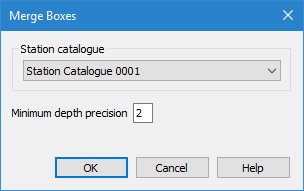
Option | Description |
|---|---|
Station catalogue | The station catalogue that was used to detect the shoals. When the shoals were detected, a specific station catalogue was used to determine reference depth and orientation. The same station catalogue must be used when merging the shoal boxes. By default, the last selected station catalogue will be selected in the dialog box. The drop-down list is populated with all station catalogues in the currently open reference model. |
Minimum depth precision | The number of decimal places to include in the Minimum depth (shldep) attribute value of shoal boxes. The default value is 2. |
Procedure
1. Select the Shoal Boxes layer in the Layers window.
2. Select the shoal boxes in the Display window that you want to merge.
3. Select the Merge Boxes command.
The Merge Boxes dialog box is displayed.
4. Select a Station catalogue from the drop‑down list.
5. [Optional] Change the Minimum depth precision value.
6. Click OK.
The shoal boxes are merged into a single box. If the results of the merge were not desireable, the Undo command can be used to reverse it, as long as the changes have not been saved. If the shoal boxes are reoriented, the merge will automatically be undone as it will no longer be applicable.
