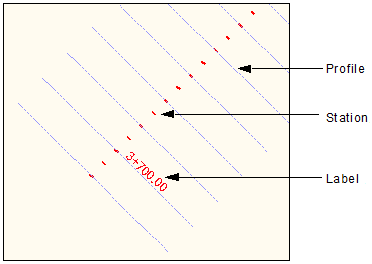
Stations are markers along a continuous sequence of alignments. By default, profile lines are perpendicular to the alignment, at a given station. After you group alignments, you need to define stationing rules for stations, profiles and alignment labels.
Interface
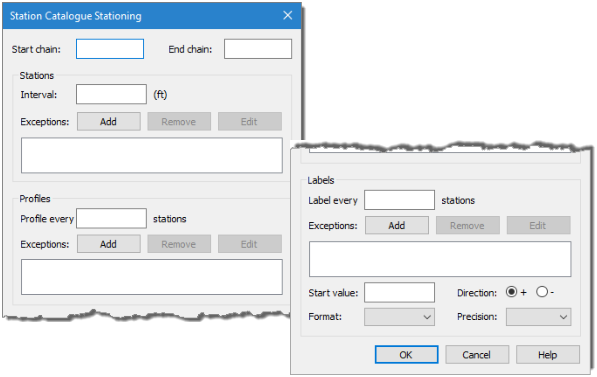
The following dialog box is used to define stationing for a station catalogue.
Option | Description |
|---|---|
Start chain | The chain defines the range set for which stations, profiles and labels will be created for the station catalogue. Once stations have been created, they can be queried to find their chain value along the sequence of alignments. The start chain value is the starting point of the range set. This value is found by measuring the distance from the beginning of the first alignment in the station catalogue to the point at which to begin calculations. The Measure Distance and Angle tool can be used to measure this distance. |
End chain | The end chain value is last point in the range set. This value can be found by measuring the distance from the beginning of the first alignment to the end point of the last alignment associated with the station catalogue. The Measure Distance and Angle tool can be used to measure this distance. Stationing rules defined for a sequence of alignments cannot have gaps between adjoining alignments. |
Stations Interval | The distance between stations. |
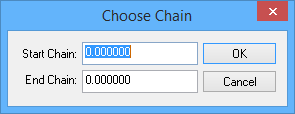
Stations Exceptions | Identify specific chains to exclude when applying stationing. The exclusion is defined by specifying start and end chain values for the section along the series of alignments that is to be excluded from stationing. These values are to be measured from the beginning of the first alignment in the series. 1. Click Add to launch the Choose Chain dialog box. 2. Specify Start Chain and End Chain values and then click OK. The exception is added to the list box for Stations. 2. To remove an exception, select it in the list and click Remove. 3. To change the start and end chain values of an exception, select it in the list and click Edit. This will launch the Choose Chain dialog box where the values can be changed. |
Profile every | The closeness, or the frequency of placement, of one profile in relation to any other profile. |
Profile Exceptions | Identify specific chains to exclude when applying profiling. This is specified in the same manner as station exceptions. |
Label every | The frequency of labels in relation to the number of stations. |
Label Exceptions | Identify specific chains to exclude when applying labelling. This is specified in the same manner as station exceptions. |
Start value | The label value for the first labelled station. |
Format | The format to use for displaying labels. |
Direction | The direction in which the labels will be incremented, either negative or positive. |
Precision | The number of decimal places to include in the values displayed for labels. |
Procedure
1. Select the Stationing option.
2. Click Add.
The Station Catalogue Stationing dialog box is displayed.
3. Type the Start chain value.
4. Type the End chain value.
5. Type the Station Interval value.
6. Define any needed station exceptions.
7. Type a value in the Profile every field.
8. Define any needed profile exceptions.
9. Type a value in the Label every field.
10. Define any needed label exceptions.
11. Type a value in the Start value field.
12. Select the Direction of the labels.
13. Select a Format option.
14. Specify the number of decimal places to display for labels.
15. Click OK.
The Display window refreshes to show the stations, profiles and labels that were created .