Menu | Tools > HIPS and SIPS > Navigation > Set Interpolation |
Position observations do not usually occur at exactly the same instant as a depth observation (ping). Thus it is unlikely that there is position data for every ping.
For example, positions observations may be taken every second, (1 Hz frequency), while pings may be observed 10 times a second (10 Hz frequency). So, in most cases it will be necessary to interpolate positions to match the time for each ping.
You use either linear or Bezier method of interpolation.
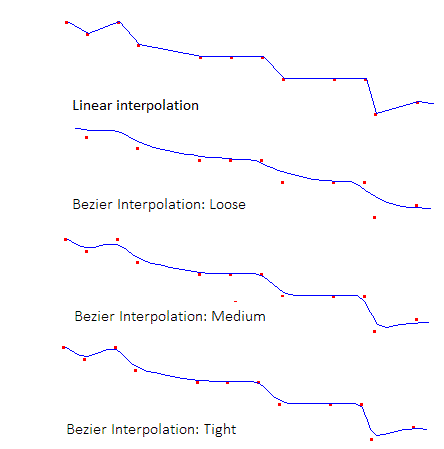
• Linear: Calculate new positions by connecting consecutive positions using straight lines. This is the default method.
• Bezier: Calculate new positions by connecting points using a Bezier curve that does not necessarily connect all navigation positions. Bezier curves are available in three types: tight, medium and loose.
Linear interpolation is suitable if the original navigation positions are clean and do not significantly deviate from neighbouring positions. Bezier interpolation is suitable if the original data is noisy.
In the Navigation Editor the interpolation method is set in the Set Interpolation dialog box.
1. Select Set Interpolation command from the Tools > Editors >Navigation menu.
2. Select either Linear or Bezier Curve by selecting the appropriate check box.
3. If the Bezier Curve option is enabled, select either a Loose, Medium or Tight format from the drop-down menu.
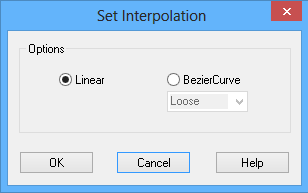
4. Click OK to apply.