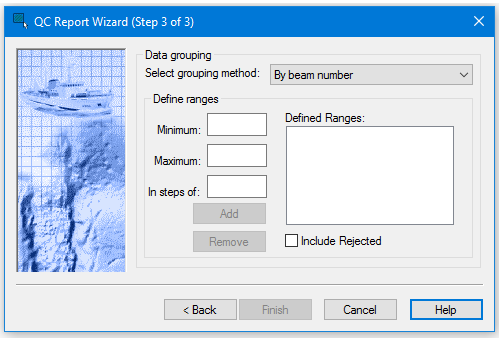
The QC Report - Wizard Step 3 dialog box is used to define how soundings are grouped in the QC Report.
Soundings are grouped by:
• Beam number: Soundings are grouped according to across-track beam number.
• Angle: Soundings are grouped according to beam angle from nadir.
• Distance: Soundings are grouped according to across-track distance from nadir.
Soundings can be organized by range. The range values must correspond to grouping method selected above.
Ranges are incremented according to the value entered in the
In steps of: field. For example, for beam numbers 1 to 100 with an increment of 10, the beams are then displayed in the QC Report window in 10 rows.
Procedure
1. Select a method for grouping soundings from the drop-down list.
2. Type the range in the Minimum and Maximum fields.
3. Type a value to increment the ranges.
4. Click Add to display the range in the Defined Ranges list.
5. To remove a range, select it in the Defined Ranges list and click Remove.
6. To include rejected soundings, select the Include Rejected check box.
7. Click Finish to complete the wizard. This will close the dialog box, and the launch the Report window displaying the quality control report.
Or,
8. Click Cancel to close the wizard without implementing changes.