Menu | Select > Relationships |
Select and view relationships and add masters and slaves to the selection.
A master/slave relationship is a hierarchical relationship between features at the same location. One feature is designated the master, others are its slaves. For example, a buoy could be a master and attached equipment such as lights and navigational devices would be its slaves.
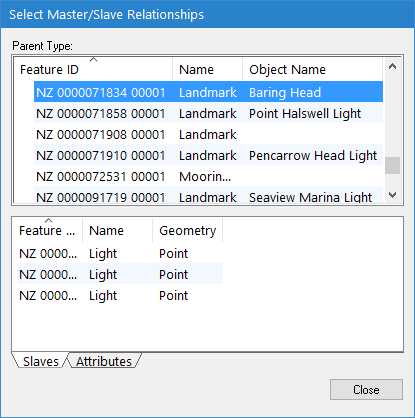
The Select Relationships command uses the Select Master/Slave Relationships dialog box. This dialog box is also accessible from the Relations window. This window is not part of the interface by default and must be added using the View > Windows command. The Relations window displays the relationship of a superselected feature, if it is part of a relationship. When a feature is populated in the Relations window, you can right-click that feature and select the View Relationships command to launch the Select Master/Slave Relationships dialog box.
Related commands:
• Create Relationships
• Edit Relationships
Interface
The Select Master/Slave Relationships dialog box is described below.
Panel | Description |
|---|---|
Parent Type | A list of masters. Contains the following information: • Feature ID: The feature object ID • Name: The attribute name of the master object • Object Name: The user-specified name assigned to the master object |
Slaves | A list of the slaves of the selected master. |
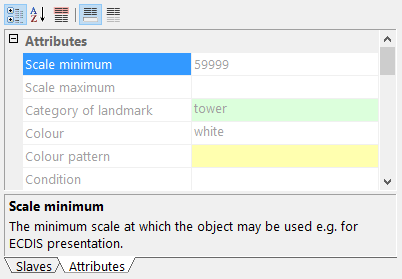
Attributes | The attributes of the selected master. The attribute values are read-only.
|
Procedure
1. Select the Select Relationships command.
2. Add features to the selection or create a new selection using the various pop-up menus.
Menu item | Description |
|---|---|
Parent Type | |
Add to Selection From > All Masters | Add all listed master features to the existing selection. |
Add to Selection From > This Master | Add selected master features to the existing selection. |
Add to Selection From > Slaves of this Master | Add all slaves of the selected master to the existing selection. |
Create Selection From > All Masters | Create a new selection from all listed master features. |
Create Selection From > This Master | Create a new selection from the selected master feature. |
Create Selection From > Slaves of this Master | Create a new selection from the slaves of the selected master feature. |
Slaves | |
Add Slave to Selection | Add the selected slaves to the existing selection. |
Create Selection from Slave | Create a new selection from the selected slaves. |