Menu | View > Zoom/Pan Extents > Manage Extents |
Manage the extents created using the Zoom/Pan New Extents command.
Related commands:
• Pan Mode
• Zoom/Pan Next / Zoom/Pan Previous
Interface
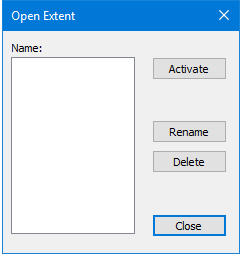
The Open Extent dialog box is used to manage saved extents.
Option | Description |
|---|---|
Activate | Apply the selected extent to the display in the 2D View. 1. Select a saved extent in the list. 2. Click Activate. |
Rename | Rename the selected extent. 1. Select a saved extent in the list. 2. Click Rename. The Rename Extent dialog box is displayed. 3. Type a new name for the extent and click OK. |
Delete | Delete the selected extent. 1. Select a saved extent in the list. 2. Click Delete. |
Close | Close the Open Extent dialog box. |
Procedure
1. Select the Zoom/Pan Manage Extents command.
2. Select an extent from the list.
3. Perform the desired action (activate, rename or delete).
4. Click Close to close the dialog box, if needed.
The display in the 2D View is updated if affected by the changes.